7. Settings and safety
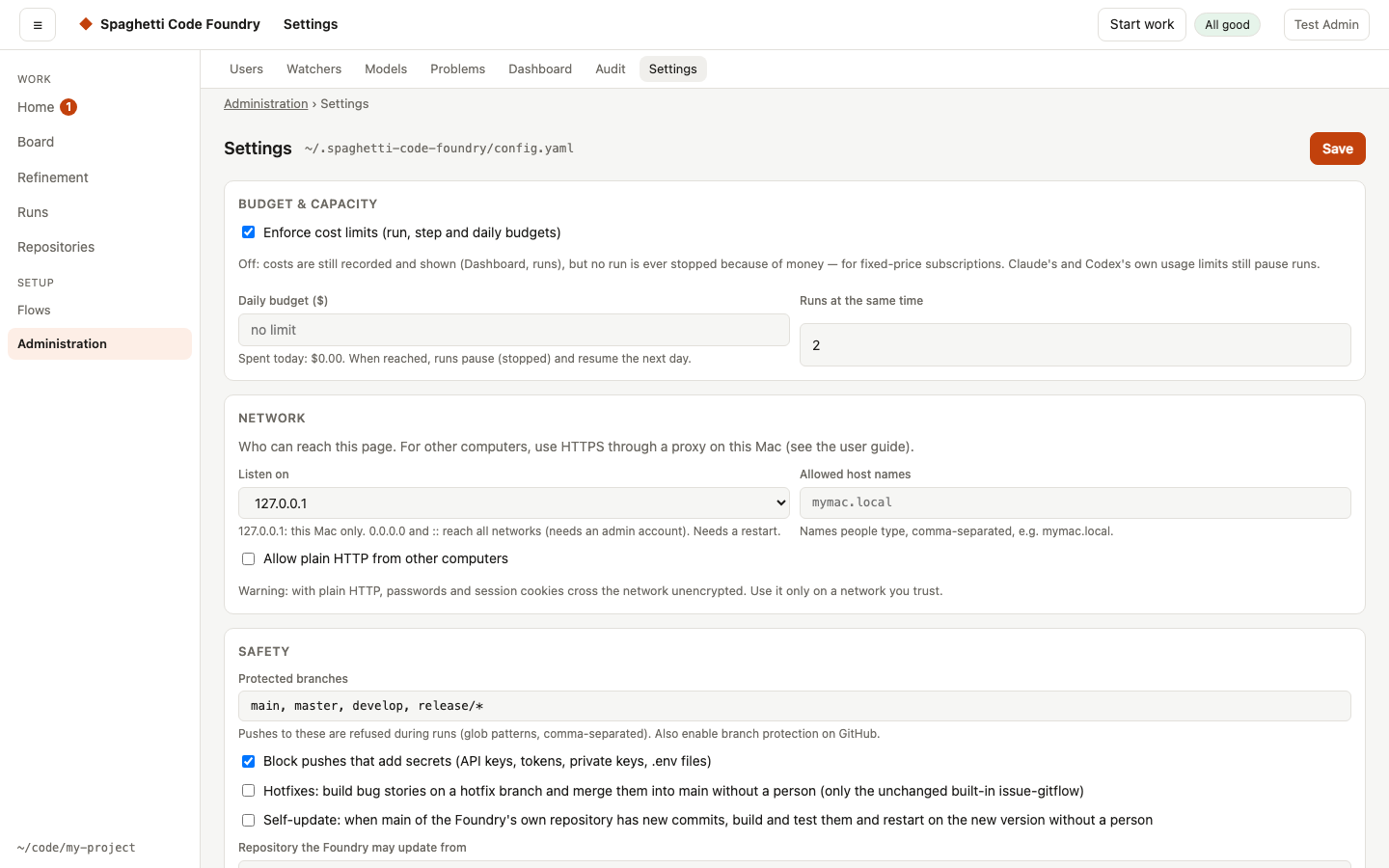
Saving. Next to Save the page says "Saving…", then "Saved at …" or "Not saved.". A message also appears. Clean up in the Disk section asks first in a dialog.
Saving keeps your file. A save changes only the settings you changed in config.yaml: your comments and the order of the keys stay, and a setting you put back to its default is removed from the file. If someone else saved, or the file was edited by hand, since you opened the page, the save is refused with "the settings changed since you loaded them — reload first". Reload the page and make the change again. A hand edit shows on the page at once, but the server uses it only after the next save or a restart.
Restart when no story is running. Some settings, such as Listen on, take effect only after a restart. After a save that changed one, the page says "A restart is needed" with the running and the saved value. When the server runs under the supervisor (also when you started it with scf ui in a terminal), the page offers Restart when no story is running. Otherwise it says to stop the server and start it again. The restart works like a new version: no new runs start and the watchers stop until the active runs are done, then the server starts again by itself. While it waits, the box says why, how many runs are still active, and offers Cancel the restart; cancelling starts the runs and watchers again. A restart for a new version or a moved data folder takes over a waiting restart, and then it cannot be cancelled. The box is refreshed every 5 seconds. Asking for the restart and cancelling it are written to the audit log (restart-request, restart-cancel).
Controls and their help. Every control shows its default, one sentence on what it does and when it takes effect ("at once", "when a run starts or resumes" or "after a restart"). The Agents card sets isolate_agents and the failure summary (failure_summary.enabled, failure_summary.model). The User runs card sets step_env.pass and step_env.agent_pass (at most 100 names each) and sandbox.user_read (at most 50 absolute paths). A value the server would refuse, such as a name starting with GH_, a relative path or a list that is too long, is marked at its field and cannot be saved. Set at start-up is a read-only card: the data folder, port, repository and program paths are set when the server starts (change them there and restart), not on this page.
Every setting has a control. Each setting that you can change in the interface has a control here, with its default, its help and when it takes effect. The few settings without one stay in config.yaml: the lists of accounts that may not ask Ask SCF or may ask in the pilot stage (help.disabled_accounts, help.pilot_accounts), the list of texts Ask SCF keeps out (help.sensitive_patterns), and the prices of a provider that reports tokens but no cost.
Start-up settings. The data folder, the port, the repository and the program paths are read only when the server starts, so they are not changed on this page. To change one, stop the server, change it where it is set, and start the server again; the Set at start-up card shows the values in use. Two things are set up once, not in settings: the first admin is made on the setup page when the server starts for the first time, and the login service is installed with scf service install (see Upgrading).
Budget & capacity — the daily budget stops new work when today's (estimated) spend reaches
it; paused runs continue the next day. An admin can also set a daily budget per user (Users page). Flows can also cap one run (limits.max_cost_usd).
Safety
- Protected branches — pushes to these branches (default
main,master,develop,release/*) are refused during runs, whoever tries. Claude Code is not allowed to rungit pushat all, and Codex's sandbox has no network access by default — pushing is a flow step. This stops ordinary pushes from steps and agents; for a hard block use branch protection on GitHub (and allow the Foundry's account when hotfixes are on). - Hotfixes — off by default. When on, bug stories (label from
hotfix_labels) of the built-inissue-gitfloware merged intomainanddevelopwithout a person, after tests and reviews. This is the one exception to Protected branches: only the merge-to-mainstep of the unchanged built-in flow may pushmain; flows you write never can. Stored ashotfix_to_maininconfig.yaml(an older build rejects that key). - Repository access — shell steps that call
ghor the remote carryrepo_access: true, so only they will get the repository's credential (see Step types). - Self-update — off by default. When on, the Foundry builds and tests new commits of
mainof the repository you name and restarts on them without a person (see Self-update). Stored asself_updateinconfig.yaml(an older build rejects that key). - Audit log — "Keep the audit log for … days": a whole number from 1 to 3650, default 180.
Older lines are removed when the server starts and once a day (see "How long the audit log is
kept" below). Stored as
audit.retention_daysinconfig.yaml(an older build rejects that key). - Secret scan — every push is checked for API keys, tokens, private keys, connection
strings and
.env/key files in the new commits. Findings are shown masked and the push is refused. A private-key header only counts when key data follows it, so code (or a test) that writes a PEM around a key it generates is fine. For a false positive, addfactory:allow-secretto the line or a pattern to.claude-factory/secret-allowin the repository. - Risk gate — in
issue-gitflow, every plan gets a risk score (0–100) from Opus and from Codex; above 75 (risk_threshold) a human must/approveit before any code is written. See The risk score. - Sandboxing — Sandbox agents' shell commands limits what agents' shell commands can write to the run's workspace. Shell steps marked Run in Docker (like the test steps) run in the Docker image you set, with only the workspace mounted.
- Approval steps in flows let you decide before anything irreversible happens (the risk gate and the split approval are approval steps).
Skills — the Skills card (after Safety) changes the skill folders, the sources and the limits without editing config.yaml. It has one control for each skills.* setting: the sources, the catalogue, the selection, the review checks, the skills that cannot be used, and the group Tools a skill may ask for (shell, network, file access, and what to do when a tool is not available), and the group Skill source checks (the catalogue clone for the scheduled checks and how often the server looks; see Let the server run it). Approved releases (skills.releases.approved) is a row editor: each row has a catalogue, a version and a digest; Remove deletes a row and Add a row adds one (at most 50). Empty rows and fields are left out, and a row problem from the server is shown at its row, for example "Row 1, digest: …". Each control's hint gives the default; changes take effect when a run starts or resumes. Before a save, a change that lowers safety asks first in a dialog that names each risk, and Cancel saves nothing. The risky changes are: turning on repository skills or unreleased releases, adding a folder to roots, setting an unresolved case to warn (a skill that is unknown, not installed, not from an approved release, in conflict or too large no longer stops a run), removing a term from the high-risk list, turning on network access for skills, setting a missing tool to degrade (a run continues without a tool a skill asked for), and setting or changing the folder of Catalogue clone for source checks (the server then commits, pushes branches and opens pull requests there). Turning a risky value back off, or removing a folder, asks nothing. The dialog exists because those settings let skills the approved catalogue does not vouch for reach the agents, or let a run continue past a skill it should stop for. If the server cannot describe the skills settings, the card says so and a save keeps them unchanged. When the server refuses a save, each skills problem is shown under the control it belongs to (for a list, at its line, for example "Line 2: …"); a problem outside the skills settings stays in the banner at the top. A successful save clears all of these messages. Stored as skills in config.yaml.
Notifications — macOS notifications and a Slack webhook tell you only when something new lands under Needs you on Home (a question, a risky plan or split, a release pull request, a failure, a watcher error). Nothing is sent for progress. A run that succeeds is told only if you switch on "Also notify when a run succeeds" (off by default; runs that finished before you switched it on are not told).
The Slack webhook is set in Settings → Notifications. The page shows only set or not set. Enter a new address to replace the webhook, leave the field empty to keep it, or tick Remove the Slack webhook to remove it. The webhook is never shown again, and no API answer contains it (GET /api/config says only notify.slack_webhook_set).
No notification and no notify.command is sent for a run whose issue is known to be closed on GitHub. When the state is unknown or open, they are sent as before.
- Message: it says who has to do what, for example "acme/app#7 — The step
run_tests failed: its command ended with an error — look at the output of the step and fix the
cause, then remove the
factory:failedlabel to start over, or resume the run on its page to continue at the failed step." It is at most 300 characters; a long title or reason is shortened, the action never. - Grouped and throttled: at most one notification every N minutes (default 5, at least 1). Items that appear in that time come as one message, for example "3 things need you". Each item is told once; it is told again only when its situation changes.
- Quiet hours: set "from" and "to" (this machine's clock, may cross midnight). Nothing is sent in that time; what is still waiting afterwards is sent then.
- Daily summary (optional): set a time. Once a day you get a short message, for example "Done since yesterday: 3 stories, 2 other runs. Waiting for you: 1. Expected today: 2 stories being built, release pull request around 17:00." It follows the throttle and quiet hours, and is skipped when there is nothing to say.
- Click: on macOS a click opens the item, if
terminal-notifieris installed (brew install terminal-notifier, allow it in the macOS notification settings). It must be on thePATHthe server runs with; runscf service installagain after installing it. Without it the notification shows but a click does nothing. Settings says which case applies. Slack messages always carry an "Open" link. - Command: your own command still runs for every finished run, as before, for the outcomes
you tick ("Run the command when a run is:"), with
FACTORY_STATUS,FACTORY_RUN_ID,FACTORY_FLOWandFACTORY_MESSAGEset. - Who sends: the server (
scf ui/scf serve) sends the macOS and Slack messages, also for runs started withscf run. Without a running server only the command runs.
Bot identity — by default commits and comments are made as you. Set a bot name/email and a token (or a GitHub App) to make them as a bot instead. In a run that never uses the machine's login (every user's run, and an admin's run on a repository with a stored sign-in) the bot's token is never used; the bot name and e-mail are, else the name and e-mail of the run's owner.
GitHub App — one app for the whole Foundry. It lets users connect a repository without a personal token (the method "GitHub App" on My repositories). Set it up once:
- Create a GitHub App. Give it the repository permissions Contents, Issues and Pull requests, each
"Read and write". Download its private key (a
.pemfile) and keep it readable only by the server's account. - Fill in Settings → GitHub App: App ID; App name (slug), the last part of
https://github.com/apps/<name>; Private key file, the path of the.pem; and, only if you want the bot identity, Installation ID (optional). With an installation ID, runs commit and comment as the app (this works as before). Without one, the app is used only for the repository method. - Without an app ID, a key file and a name, the method is not offered, and the API answers 400.
- Under the settings, Repositories that use the app opens the list of repositories that use the app
(
#/all-repos?method=github-app). A repository whose app was removed says "The administrator removed the GitHub App" as its attention state; its owner chooses another authentication.
The server finds the installation with the app's own key, so a user needs no rights on GitHub. That is why
each account has a list of the repositories it may connect through the app. Set it on the Users page with the
"App repositories" button: one entry per line, owner/name, or owner/* for every repository of an owner.
An admin's own connections are not limited. A user cannot read or change any list, or these settings.
- Adding a repository, changing its method to the app and testing an app connection answer 403 when the repository is not on the account's list. GitHub is not asked.
- An account without a list can connect nothing through the app. After an upgrade, set the list of every account that needs the app.
- The list is checked only when a connection is added, changed or tested. Existing connections keep working in runs and watchers, also when you later remove an entry. To cut one off, remove the connection. The admin's Repositories page marks an app connection that is not on its account's list with "not on the app list".
- Still install the app only on repositories that Foundry users may work in, and choose "Only select repositories".
After the first save with a name, an older build of the Foundry rejects the new slug field in config.yaml.
Disk — every run keeps its workspace so you can inspect or resume it. Remove old ones on the
Maintenance page (Administration › Maintenance, #/maintenance; it is no longer on Settings) or with scf clean (branches in your repositories are kept).
Accounts. scf user keeps accounts in users.json in the data folder. Each account has an id,
name, e-mail, role (admin or user), status (active or blocked), password hash, created time
and last sign-in. An account can have no password yet: it has no hash, it cannot sign in, and it may
have a passwordLink (id, the SHA-256 of the link token, and expires) instead. Only you can read the file (mode 0600). A data folder that does not exist yet is
created with mode 0700. Passwords are never stored: each one is hashed with scrypt, a 16-byte
random salt per account, N=32768, r=8, p=3 and a 64-byte key. The parameters are stored with each
hash (scrypt$N=32768,r=8,p=3$<salt>$<key>). A hash in any other form makes the file invalid.
Anyone who can run commands on the machine as you has admin rights: they can read the file or run
scf user create --admin. This includes the agent and shell steps of flows, which run as your
user. A file that cannot be read or is not valid is an error, never "no accounts".
The last admin that is not blocked cannot be demoted, blocked or deleted: the command says "make
another admin first", changes nothing and exits 1. An admin that has no password yet does not count
as another admin. Change a role with
scf user role <e-mail> admin|user. scf user list shows the last sign-in of each account
("never" when there is none).
The Users page. Admins only: Users in the top bar (#/users). It lists name, e-mail, role,
status, last sign-in and the number of runs. The status is blocked, no password yet,
locked (too many wrong tries) or active; when more than one is true, the first in this list
wins, so a blocked account reads "blocked" even if it is also locked. Your own account is
marked "(you)". The list has no action buttons: press a name to open the account page
(#/users/<id>). It shows the same facts and the actions in three groups: Actions (Edit,
Limits, App repositories, New link, View as user), Security (Reset password, Unlock, Block or
Unblock) and Danger (Delete). The buttons below are on that page. An address for an account
that does not exist shows "This account does not exist." with a link back to Users.
- Add user asks for name, e-mail and role. Then the dialog shows the set-password link once. The link works once, for 24 hours, and you must send it to the user yourself. Copy needs HTTPS or localhost; otherwise select the link in the field and copy it. Close the dialog too early and the link is gone: use New link.
- New link (only for an account without a password) shows a fresh link; the earlier one stops working. For a blocked account the link works only after you unblock it.
- Reset password (only for an account with a password) removes the password, signs the account out everywhere and shows a one-time link, like Add user. Until the link is used the person cannot sign in. The last admin that can sign in cannot be reset; resetting your own account signs you out (the link is in the dialog). If the dialog shows an error and the account now reads "no password yet", the reset happened but its link was not shown: use New link.
- Unlock (only for a locked account) removes the lock and the wrong tries of the account. A wait of up to a minute for the address the wrong tries came from can remain, so the person may need to wait a moment. It leaves no line in the audit log.
- Edit changes name, e-mail and role. After an e-mail change, set a watcher's
owneragain (see above). - Block signs the user out, cancels their queued runs and lets running runs finish. Also stop all their work now also cancels running runs and runs that wait for approval. The page then says how many runs were cancelled.
- Unblock lets the user sign in again. Cancelled runs are not restarted.
- Delete asks first, names the account, wipes its stored credentials and keeps its runs
(they show
deleted user). It cannot be undone. - Limits (per account) and Default limits (toolbar) set three limits: runs at the same
time, runs per day and the daily budget in USD. An empty field means "no limit". The defaults
apply to every account, admins too; an account's own value wins over the default. The Limits
column shows each account's effective limits and marks its own values with "(own)". Clear a field
in the account's dialog and the default applies again. Deleting an account removes its own
limits. All three limits are enforced. A job over a limit waits in the queue and starts by itself when the limit allows; the queue and the run page say which limit it is. Free slots are shared between users: the next slot goes to the user with the fewest working runs, then to the user whose last start is oldest. Only new runs count for "runs per day" (local day); resuming, answering or approving a run does not. Architect runs of a refinement session count for "at the same time" but not for "runs per day". Runs of a watcher count for the watcher's owner. Runs without an owner (the command line) are not limited in the queue, but a run that falls to the first admin counts for that admin, so an admin who uses the command line may need to raise their own limits. The daily budget counts the cost of the user's runs that started today (local day). When it is reached, no new job of that user starts and a working run stops before its next agent step (shell and approval steps still run); it continues the next day, or when you raise the budget. A watcher starts no new work for that owner and holds the issue. The user sees "waiting — your limit for today is reached", with no amount; you see the amount.
cost_limits: falseturns the budget off, and the globaldaily_budget_usdstill applies on top. Runs without an owner are only under the global budget. Lowering a limit does not stop working runs; nothing new starts until usage is below it. Only admins can see or change them, and no answer to a user contains them. Each change writes alimits-changeline to the audit log with the account (or "defaults") and the field names, not the amounts. Without alimits.jsonin the data folder, everything is "no limit".
A refusal (the last admin, an e-mail that is taken, bad input) shows in the dialog and the list does not change. An error from Block or Delete can come after the change was made; close the dialog to see the list again. Blocking or deleting your own account signs you out, and the page reloads.
Managing accounts over the API. Admins only (a user gets 403). GET /api/users lists the
accounts (id, name, email, role, status, created, lastSignIn, runs, hasPassword, lockedUntil: an ISO time while the account is locked, else null; a blocked account can have both).
POST /api/users {"name": …, "email": …, "role": "admin"|"user"} adds an account without a password
and answers 201 with the account and its one-time token (400 for bad input, 409 for a taken e-mail).
The token is shown once; the link is <address>/#/set-password/<token>.
PUT /api/users/<id> changes name, email or role: leave a field out to keep it; null is not
accepted (400). POST /api/users/<id>/block {"stopWork": true} blocks, signs the account out and
answers with cancelled: {queued, running, waiting}. POST /api/users/<id>/unblock unblocks.
POST /api/users/<id>/link gives a new token for an account without a password (409 if it has one).
POST /api/users/<id>/reset removes the password, ends the account's sessions and answers like
/link (user, token, expires); 409 for an account without a password or for the last admin
that can sign in. POST /api/users/<id>/unlock removes the lock and wrong tries of the account and
answers with the account. Everyone signed in may call POST /api/password {"current": …, "password": …}
to change their own password (400 for bad input, 403 for a wrong current password, 429 when waiting).
DELETE /api/users/<id> deletes as scf user delete does. An unknown id is 404, the last admin that
is not blocked is 409. An admin may act on their own account within the last-admin rule; blocking
yourself signs you out. If an old key stays in the Keychain, delete answers 500 and the account is
gone; run scf credential rotate-key. A watcher's owner is an e-mail: after changing an account's
e-mail, set the owner again, or its new runs go to the first admin.
What a block or delete stops. Through the API the server acts at once and answers with the
numbers; running runs are told to stop and show as cancelled a moment later. A blocked or deleted account cannot start anything new. The jobs it
queued are cancelled (the server checks every 2 seconds; a block made while the server was down is
handled at the next start, before any job starts). A job it queued never starts, also after a
restart. Its running runs finish, and runs that wait for approval stay as they are. An admin can
still resume, approve or reject such a run, and that job runs. scf user block <e-mail> --stop-work
also cancels the account's running runs and its runs that wait for approval; workspaces are kept.
The server acts on --stop-work once, when it sees it (about 2 seconds, or at the next start), and
it covers every run the account owns at that moment. An admin's resume made in that gap is
cancelled too. scf user unblock restarts nothing and removes a stop-work request the server has
not handled yet. Watchers of the account keep working: disable the watcher or change its owner. The
server log says how many runs it cancelled, with the account id only.
Audit log. Every scf user action and every users API call that changes something (create, password, role, edit,
block, unblock, delete, reset; also link, when a new set-password link replaces the old one) adds one line to audit.jsonl in the data folder (mode 0600), for
example {"time":"2026-10-02T09:46:46.000Z","by":"cli","action":"role","userId":"<id>","oldRole":"user","newRole":"admin"}.
by is cli or the id of the admin. An edit line is a name or e-mail change. A password set through a link is a password line made by the account itself (by is its id), and so is a password changed with Change password. A reset line has the admin's id (or cli) in by.
Only a role change has oldRole and newRole. A block line has stopWork (true when
--stop-work was given). No line holds a name, e-mail, password, hash, key or
token, and a failed account change is not logged. A block or delete that stops with an error may already have
signed the account out or removed its repositories and stored credentials; the server log names the
problem, and the same action made again finishes the job and writes the line. If the file cannot be written, the command stops before
it changes anything. In the rare case that the line cannot be added after the change (for example a
full disk), the command says so and exits 1. The file is a record, not a protection: anyone who runs
commands as you can edit it.
Every sign-in is also a line, for example {"time":"2026-10-02T09:50:00.000Z","by":"<id>","action":"sign-in","result":"ok","userId":"<id>"}.
A sign-in that works has result ok, and by and userId are the account id. A sign-in that fails (wrong password,
unknown e-mail, blocked account) has result failed and by anonymous; it has userId only when the e-mail belongs to an
account, so a wrong password and an unknown e-mail each write one line. The typed e-mail and password are never written. A try that is
refused with 429, a bad request and an over-long e-mail write no line. The first admin made on the setup page writes a
create line with by set to its own id (no sign-in line); if audit.jsonl cannot be opened, setup stops with an error and
makes no account. Event lines can also hold a short target (instead of userId) and a detail (only with a target); sign-ins
use neither. A sign-in line that cannot be written (for example while another scf command holds the lock) does not stop the
sign-in; the server log says auth: audit.jsonl cannot-write.
What people do in the web interface is also logged, with result ok, by set to the account that made the call, and a target
(and sometimes a detail). An Ask SCF line never holds a question, an answer, a confirmation token or the text of a model:
action | When | target | detail |
|---|---|---|---|
run-start | A run is started | run id | |
run-cancel, run-approve, run-reject, run-resume | A run is cancelled, approved, rejected or resumed (a cancel that cancelled nothing writes no line) | run id | |
run-archive, run-unarchive | A finished run was archived or taken out of the archive (a repeat call writes a line too) | run id | |
run-answer | An answer to the questions of a run was accepted (a refused call writes no line; the text is never logged) | run id | |
refinement-publish | Ready drafts of a refinement session were published | session id | repository and issue numbers |
repo-add, repo-change, repo-remove | A repository is added, its sign-in is changed, or it is removed | repository id | stored address |
repo-change (admin) | An admin changes the settings of a repository | repository id | settings: and the names of the changed fields |
repo-change (admin) | An admin changes a watcher of a repository | repository id | one line per changed option: watcher <id>: <option>: <old> -> <new> |
repo-transfer (admin) | An admin moves a repository | repository id | id of the new owner |
credential-add, credential-remove | A credential is added or removed | credential id | its type |
flow-publish | A published flow is saved with a new version | flow name | version |
settings-change | Settings are saved | config.yaml | one line per changed setting: <key path>: <old> -> <new> (see below) |
restart-request, restart-cancel (admin) | A restart is asked for after a settings change, or cancelled (see Restart when no story is running in section 7) | server | on a request: the settings that need the restart, as <key>: <running> -> <saved> |
help-action | An approved action of Ask SCF ran (ok) or was refused (failed). A token, request text and model text are never logged | conversation <id> | <action>; run <id>; <result>, or refused: <code> |
help-ask | A question to Ask SCF was taken, or a failed answer was tried again (result ok), or it was refused: switched off, not for this account, busy, the queue is full, a limit (result failed). The question and the answer are never logged | conversation <id> (conversation when a refused question had none yet) | ask or retry; then turn <id>; try <n>, or refused: <code> |
help-delete | An account deleted one of its Ask SCF conversations | conversation <id> | |
help-export | An account exported its Ask SCF conversations | conversations | how many |
help-action | An account followed an offer of an Ask SCF reply (opened a page). Refused when the thing is gone (404), not allowed now (403) or the conversation is deleted (410) | conversation <id> | <type> (for example open-run), or refused: denied or refused: stale |
turn-answer, turn-approve, turn-reject, turn-retry | An action under Needs you on Home (defaults and answer are turn-answer; retry and a retry with a hint are turn-retry) | owner/repo#issue |
A line is written when the change is made. A call that is refused or fails before any change writes no line, and neither does a
call that changes nothing (the same repository settings again, a flow saved without a change, an unpublished flow). If an old key
is left in the Keychain, the change was made, so its line is written even though the answer is an error. Tokens, passwords, keys,
notes, task text, credential names and the values of the masked settings (below) are never written. A line that cannot be written does not stop or undo the
action, and a line is not written while another scf command holds the lock; the server log then says
audit: <file> <kind> (<action>). Runs that a watcher starts, scf run, scf approve, scf reject, evals, deleting or
unpublishing a flow, blocks, clean-up and running a watcher now are not logged. A target can be up to 255 characters.
Settings and watcher lines. A save of the settings writes one line per setting that changed, with the full key path, the old
value and the new value, for example monitor.stuck_run.extra_minutes: 30 -> 60. A setting that was not set shows (not set).
A watcher in config.yaml is named watchers.<id>.<option>. A change to a repository watcher is written the same way, as
watcher <id>: every: "5m" -> "10m". Three settings never show a value, only changed: notify.slack_webhook, notify.command
and agent_env (the environment of a watcher, on any path). A watcher's owner (an account's e-mail) and task (free text) say
only changed too. A value longer than 80 characters is cut and ends with …; a line is at most 2,000 characters.
The Audit page. Admins only: Audit in the top bar (#/audit). It shows who did what, newest first: time, who, action,
target and result. "Who" is the account's name, "command line" for scf, or "not signed in" for a failed sign-in. An account
that is gone shows as "deleted user". A detail, such as user -> admin for a role change, is under the target.
- Filters. User (a list of the accounts; it finds what the account did and what was done to it), action, and a from and a to date. The dates are days in your browser's time zone; both days are included. Changing a filter reloads the list.
- Export CSV downloads every line that matches the filters shown, oldest first.
- The page shows the newest 500 lines. When there are more, it says so: narrow the filters or use Export CSV.
- An empty result says "No entries." An error, such as a log that cannot be read, shows on the page.
An account with the role user never sees the link or the page; a user who opens /#/audit lands on My runs.
View as user. An admin can open the display of one user and see what that user sees, read-only.
- Start. On the Users page, press View as user on an account with the role user (admins do not have the button). The user display opens at
/user/?as=<id>with that user's My runs, run page, My repositories, Refinement and Start work. - The bar. A bar at the top says "You are viewing as <name>. Nothing can be changed here." Press Back to the admin display to end the view and return to the Users page. The top bar still shows your own name and Sign out.
- Read-only. Buttons that only change things are not shown: Start, Add repository, Remove, Approve, Reject, Retry, Cancel, Send answer and the buttons of a refinement session. A button that is still there, such as Change password, shows "This is a preview. Nothing can be changed here." and sends nothing. The page sends no changing call in this mode.
- When the view ends. A view ends after 30 minutes, or when the server restarts. The page then says so and offers View again (a new start, a new audit line) and Back to the admin display. It never shows your own data instead. A view opened in another tab, or when the browser cannot keep the user's name, also shows this card.
- Other cases.
/user/withoutasstill sends an admin to the admin display. If a user opens/user/?as=…, the parameter is ignored.
View as user (server). The part below is what the server does for the page above.
- Start.
POST /api/admin/view-aswith{"userId": "…"}starts a view for your session and answers{id, name}of the user. It writes one audit line with the actionview-as(you as the actor, the user as the target). If that line cannot be written, the view does not start (503 when the log is busy, 500 otherwise). An unknown account answers 404; an account with the role admin, or your own account, answers 400. A blocked user can still be viewed. - Use. While the view runs, a
GETcall with?as=<userId>is answered as it would be for that user: the same rules (a call markednofor users is 403), and the same cut-down answers (no costs, no folders, no runs of other accounts; a foreign run is 404). This holds forflows,queue,runs,runs/:id,runs/:id/events,runs/:id/diff,repos,repos/methods,credentials,refinementandrefinement/:id. Unexpected errors show the user's fixed sentence.GET /api/sessionstill shows you as the admin. Calls withoutas=are not changed. Reads leave no audit line. - Refused.
as=without a running view for that user is 403, and so isas=from a user. Any call that is not aGETand hasas=is 403 "the preview is read-only", and nothing changes. - End. A view lasts 30 minutes and ends with the session.
DELETE /api/admin/view-asends it now. It also ends when the user is deleted or made an admin, or when you are no longer an admin. Views are kept in memory only: after a restart a new one must be started, which writes a new audit line. An open log stream started withas=is closed when the view ends.
The Audit page. Details on a line opens a row with every field of the entry: time, who (with id), action, target (with id), detail and result. It makes no new call. When the actor or target is an account, its id links to the account page. Hide closes it; a filter change closes all opened lines.
Reading the audit log over the API. Admins only; a user gets 403. GET /api/audit answers {entries, more}. An actor is {type: "cli"}, {type: "anonymous"} or {type: "account", id, name}; a target is an account in the same form, {type: "text", text}, or null. Account lines show result: "ok" and the account as target; a role change has detail like user -> admin, and a block that stops work has stop work. name is the current name, or deleted user; the file keeps ids only. Filters: user (the account id exactly as stored; it matches the actor or the target account), action, from and to (ISO times with seconds, such as 2026-10-02T09:00:00Z; both are included). A + in an offset must be written %2B. An unknown, empty or repeated filter, a user that is not an id, an action that is not an audit action, a bad time, or from after to answers 400. At most 500 entries come back, newest first by the order of the lines; when more is true, narrow the filters or use the export. GET /api/audit/export takes the same filters and downloads every matching line as audit.csv, in the order of the file (oldest first), with the header row time,actor,actor_name,action,target,target_name,result,detail. A cell that starts with =, +, - or @ gets a ' in front. Stored secrets are hidden as in every other answer; a CSV row that would show one is hidden whole. Lines that do not parse are left out. An unreadable file answers a plain 500, and the log says audit: audit.jsonl unreadable. A download that breaks half-way is cut off, not ended early.
How long the audit log is kept. Lines older than audit.retention_days (Settings → Safety, "Keep the audit log for … days"; 1 to 3650, default 180) are removed when the server starts and once a day after that. A changed setting counts at the next round, without a restart. There is no "keep for ever": download the log with GET /api/audit/export, or copy audit.jsonl, before lines age out. Only a line that can be read and is too old is removed. Lines that cannot be read stay, also a line with bytes that are not valid UTF-8; the order and the mode 0600 stay. The file is replaced in one step and is not touched when no line is old enough. If the clean-up fails or auth.lock is busy, the server keeps running, the log says audit: <file> <kind> (clean-up), and the next round tries again. scf commands never remove lines. The first start after an upgrade removes lines older than 180 days; to keep more, set audit.retention_days in config.yaml before that start.
Sign-in and sessions. The UI and its API need a signed-in account; only the sign-in, sign-out,
first-admin and set-password calls and the static files are open. A session is kept on the server in
sessions.json (mode 0600): it holds only a SHA-256 of the session token, never the token. It
lasts 7 days from sign-in and is not renewed. Sessions survive a restart and move with the data
folder. The browser holds the token in the cookie scf_session_<port> (HttpOnly,
SameSite=Strict); the port is in the name because localhost cookies are shared between ports.
The cookie gets the Secure flag when you reach the UI over HTTPS (through a proxy, see
Access from other computers); over plain HTTP on this machine it has none.
- CSRF. Every call that changes something must send the header
X-CSRF-Tokenwith the token the server gave at sign-in; otherwise it gets 403. The UI does this for you. Requests from a foreign origin or host are refused as before. - Wrong passwords. Every try is counted before the password is checked, per e-mail and per
client address. From the 5th wrong try, sign-in answers 429 (with
Retry-After) until a wait is over: 1, 2, 4, 8, 16 and 32 seconds, then 60 seconds. The 20th wrong try for an e-mail locks it for 30 minutes, also against the right password. A try with the right password is given back for the address and clears the count of the e-mail. Counts are forgotten 30 minutes after the last try. Change password counts as a sign-in try for the e-mail, and a wrong current password can delay or lock sign-in for that account. Unlock removes only the lock and the count of the account; a wait of up to a minute for the address can remain. A server restart clears all waits and locks (the CLI cannot unlock). Anyone can lock an e-mail with 20 wrong tries, so the only admin can be locked out: wait 30 minutes, ask another admin to unlock, or restart the server. The answer for a wrong password and for an unknown e-mail is the same. - Set-password links. Only a SHA-256 of the link token is stored. The token sits after
#in the address, so it is in no request line or log. A link lasts 24 hours (a link made before the upgrade keeps its stored end time).POST /api/set-passwordshares the per-client wait with sign-in (16 password checks at once); a refused password with a live link does not count, and using a link clears the wrong-tries count of that e-mail. - Ending sessions. Signing out, expiry,
scf user passwordandscf user blockend sessions, and so do block, delete and Reset password through the API. Change password ends the other sessions of the account and keeps the one that made the change. A run log that is open in the browser stops within 5 seconds. A role change does not end sessions; the new role counts from the next call. - Problems with the files. If
users.jsonorsessions.jsoncannot be read or written, or anotherscfprocess holds the lock, sign-in shows "sign-in is not working; see the server log". The log names the file and the kind of problem, never a password or a hash. The users API answers a plain 500 for such a problem and logs the same way (for exampleusers: audit.jsonl cannot-write).
Roles and permissions#
Every account has a role, admin or user. The server checks it on every call. A call that is
not in the table below answers 404, also for an admin.
- An admin may make every call and sees every page.
- A user sees only the Start work, Refinement, Runs and My repositories pages and may use the calls marked
yesorown runsin the table. Every other call answers403 {"error":"not allowed for your role"}. Pages other than Start work, Refinement, Runs and My repositories are not part of the user display at/user/. A user who opens/is sent to/user/, and any other address there goes to#/runs.
What a user does not see. The server cuts these from every answer a user gets, so the page
cannot show them: costs, tokens, budgets and prices; the model, provider and agent; step output
and transcripts (GET runs/:id/transcript/:n is for admins only); tool arguments in the log;
settings, folders and the raw reason of a failure; hidden variables of the flow. A user sees the
status, the log (steps and tool names), the questions and approvals, the steps with their result,
and the changes. A limit reads "the administrator's limit was reached". An unexpected error
answers "something went wrong on the server; ask the administrator" and the details go to the
server log. Notifications are not changed: they go to your channels with your wording, also for
runs users started, so the Slack webhook should not point at a channel users read.
Your own runs. A run has an owner: the account that started it. A user sees and may follow,
cancel, resume, approve, reject and read only their own runs. Another account's run, an unknown
run and a run without an owner all answer 404 {"error":"run not found"}, so a guessed id tells
nothing. A run started by a watcher belongs to the watcher's owner (an account's e-mail, set by
an admin; empty: the first admin). Runs from the command line and from evals belong to the first
admin. A queued run that has not started yet already counts as its owner's. An admin may use
every run.
After an upgrade. Runs from older versions have no owner. The first admin gets them at the
next server start, when the first admin is created on the setup page, and within a minute of
scf user create --admin while the server runs. A run that is still live is handed over after
it ends.
The queue. A user sees only their own queued runs. Runs of other accounts in front of them show as "n runs ahead of you", without ids.
Answering a run. On a run that waits, a user can approve or reject it with a note
(POST /api/runs/<id>/approve or /reject with {"note": "…"}). The note reaches the run. A user whose run stopped with questions answers them on the run page
(see "Answer a run's questions"); the card in My runs says so and sorts on top.
What runs sign in with. In a run you own, every step marked repo_access signs in to the repository named by github_repo with the sign-in you chose for it, and nothing else: not the bot's token, not the server's gh login or git settings. Other steps and the agents never get it.
Runs that never use the machine's login. Every run owned by a user is isolated, and so is an admin's run on a repository with a stored sign-in (a token, a deploy key or the GitHub App). In such a run no step acts with the server's login, the bot's token or the Mac's git identity. Every step, agents and shell steps without repo_access too, has no GH_TOKEN, GITHUB_TOKEN, GH_ENTERPRISE_TOKEN or bot token, an empty gh folder of its own, no git settings or credential helpers of the machine, no ssh agent and no ssh keys of the account, and no prompts. Only a step marked repo_access gets the repository's own credential. An admin's run on a repository with the method "none", one that is not in the list, or a local folder is not isolated: the machine's login and the bot's token work as before.
- Commit name. Commits in these runs use the bot name and e-mail from Settings when they are set (each on its own), else the name and e-mail of the account that owns the run. If the account was deleted and the bot name and e-mail are not both set, the step ends with "the account that owns this run could not be found, so its commits have no name": set the bot name and e-mail in Settings, then resume the run.
- After the upgrade. An unflagged step or an agent in these runs can no longer call
ghor the remote. The machine's git settings (signing, aliases, proxy) are not used; if you need a proxy or a certificate file, listHTTPS_PROXYorSSL_CERT_FILEinstep_env.pass(see "Environment of the steps"). - Environment of the steps. A step of a run owned by a user does not get the server's environment. A shell step gets
PATH,HOME,USER,LOGNAME,SHELL,TMPDIR,TMP,TEMP,LANG,LANGUAGE,LC_ALL,TZandTERM, the Foundry's ownFACTORY_…variables, and the names an admin lists. An agent step gets the same plus what its own agent and provider need (for exampleANTHROPIC_API_KEYfor Claude on an Anthropic provider,OPENAI_API_KEYfor Codex on OpenAI); keys of other providers are not passed. Admin runs are unchanged.- Admins add a variable in Settings → User runs (Variables for all steps, Variables for agent steps; a refused name is marked at its field) or in
config.yaml:step_env.passlists names for all steps,step_env.agent_passnames for agent steps only. A name may end in_*(for exampleAWS_*). Names starting withFACTORY_,SCF_,GH_,GITHUB_,GIT_orSSH_are refused, and provider keys are never passed by a list.SCF_STEP_ENV_PASSin the server's environment (comma separated) adds names too. A name onpasscan be read by every user's shell steps, so useagent_passfor a secret that only agents need (such asCLAUDE_CODE_USE_BEDROCKwith theAWS_…keys). - After the upgrade, a flow that relied on an inherited variable such as
JAVA_HOMEorNVM_DIRin a user's run needs that name added. - Hidden in output. The values of the provider key variables named in the config (
api_key_env) are hidden in logs, live output and API answers. A value shorter than 8 characters is not hidden; the server logs a line when it finds one. - The limit. The agent's own key is still visible to the agent's shell tool unless the agent program hides it.
- Admins add a variable in Settings → User runs (Variables for all steps, Variables for agent steps; a refused name is marked at its field) or in
- OS sandbox for steps of a user's run. On macOS, every shell step of a user's run starts inside a
sandbox-execprofile. The step cannot read the Mac account's home, the data folder or other runs, cannot write outside its run folder (and notrun.json,live.log,logs/or the evidence files), and cannot use the Keychain, unix sockets or open apps. The network stays open. ItsHOMEis<run folder>/homeandTMPDIR,TMPandTEMPare<run folder>/tmp, so caches in~start empty. A shell step marked Run in Docker is held by the container instead. Claude and Codex steps are held by the same profile. Their own sandbox is off, each run has its own empty agent folders, and they sign in by a token variable set for the server only (see "Trust"); without one the step is refused. Admin runs are unchanged.- Settings. Tick Allow user runs without the OS sandbox (
sandbox.user_runs: off) to run user runs without it. If no sandbox works (not macOS, orsandbox-execfails) and the box is not ticked, a user's run does not start: "This computer cannot hold a user's run in a sandbox, so the run was not started. An admin can allow user runs without it in Settings." The server variableSCF_USER_SANDBOX=off(orFACTORY_USER_SANDBOX=off) does the same. - Extra read paths.
sandbox.user_read(Settings → User runs, Extra readable paths, orconfig.yaml) lists up to 50 absolute paths a user's shell step may also read (for example a tool installed in the home). Saving Settings keeps it.
- Settings. Tick Allow user runs without the OS sandbox (
- The limit. Agent steps are not in an operating-system sandbox yet, and neither are runs with the sandbox switched off. For them, this is done through the environment of the steps. It is not an operating-system sandbox. A step runs as the server's macOS account, so it can still read that account's files and Keychain (
~/.ssh,~/.netrc, aghlogin kept in the Keychain), callsshitself, or set the variables again. Withisolate_agentson, Codex agents skip the account's~/.codex/config.tomltoo (see "Codex and your personal setup"); with it off, or in a step the OS sandbox holds, keep GitHub tokens and GitHub MCP servers out of that file. Claude Code agents skip the personal setup in these runs. A step marked Run in Docker gets nothing of the machine but the commit name; as before, the push hook does not run inside the container. A separate account or container per run is not included. - A token ("GitHub token" or "HTTPS token"):
ghand git use it. Give it Contents, Issues and Pull requests, read and write, then press Test connection; a token made for reading only fails at the first push or comment. - A deploy key: git uses it over ssh, and nothing else (no ssh agent, no key or ssh settings of the server's account; host keys are kept in
known_hostsin the data folder). The key is a file in the foldersign-inof the run folder, outside the workspace. It exists only while the marked step runs and is deleted when the step ends. A deploy key gives git access only: a step that callsghfails with "a deploy key gives git access only; choose a token or the GitHub App under My repositories". Callghby name; the check does not seeghcalled by its full path. - The GitHub App: each marked step gets a new token from the app, limited to this repository, for
ghand git. It is never stored and is hidden in the output. A token lives one hour, so a marked step with the app must finish within one hour. A step that runs longer and is then refused fails with "the app's token ran out during the step"; resume the run to get a new token. If the app is not set up, not installed on the repository or GitHub cannot be reached, the run fails with a sentence that says so.
With the method "none" an admin's run uses the server's own access; a user's run fails with "set a token for this repository under My repositories". If the sign-in is missing, cannot be read or is refused by GitHub (expired, revoked, no access), the run fails and tells you to reconnect the repository here. A push to a protected branch is still refused and the secret scan still applies.
The sign-in folder. The sign-in folder is removed when the step ends and when the run ends, however it ends. A folder left by a crash is removed when the run is resumed and when the server starts. If a folder cannot be removed, the step or the resume fails with "the sign-in folder of this run could not be removed"; ask an admin to delete the folder sign-in in the run folder, then resume the run. A background process that a step starts is stopped when the step ends.
After the upgrade. An admin's repository with a deploy key or the app no longer uses the server's own access in marked steps. A deploy-key repository cannot run steps that call gh, such as the first steps of the built-in issue flows; choose a token or the app for it.
Test connection. The button on My repositories calls POST /api/repos/<id>/test (the owner, or an admin for any
repository). It runs up to three checks and shows each with a short message: Read (a shallow clone), Write
(git push --dry-run to a scratch branch name; nothing is pushed and no branch is created) and, for GitHub
repositories, GitHub API (the repository, its issues and its pull requests can be read). The last result is saved
as the connection status and returned by GET /api/repos as connection. It is cleared when the token, key, method
or address changes, when the repository is transferred, and when its stored token or key is deleted. A test stops
after 60 seconds. A second test of the same repository while one runs, and a repository changed during its test,
answer 409. The messages tell wrong or expired tokens, a repository not found, read-only access (for a deploy key:
"added without write access"), an unreachable host, host key problems, timeouts and a token without the Issues or
Pull requests permission, and say what to do. A deploy key gives git access only, so for a GitHub repository with a
deploy key the API check is skipped; issue and pull request work needs a token or the GitHub App. The API check only
reads: the Foundry still needs "Read and write" for Issues and Pull requests, and the test does not prove that. A dry
run does not check branch rules, so a protected branch can still refuse a real push. In an empty repository the push
check uses a local commit that is never sent. Only an admin can test a repository with the method "none", whoever
owns it; for a user the test answers 409. For that method the test uses the server account's git configuration, credential helpers, SSH configuration, keys and gh
sign-in; GIT_* variables of the server are not used. SSH host keys: the first key seen is trusted and kept in
known_hosts in the data folder; remove the host's line there after a real key change (for "none", the file is
~/.ssh/known_hosts of the server's account). The server's SSH configuration is not used for a deploy key.
For the method "GitHub App" the test looks up the installation again and asks GitHub for a new short-lived token
limited to that repository; clone, push check and API check use it (it is passed to git and gh through the
environment only, and is never stored, logged or shown). If the app is no longer installed, the result says so
(app-not-installed); if the app was removed from the settings, app-not-set-up; if its key or ID is wrong,
app-broken. A changed installation ID is kept.
Provider, identity and scope. Every external connection is shown the same way: on a repository's Connection section, in the Authentication cell of the repository lists (provider, a separator and identity, with the scope under them) and on the Credentials page. Three parts:
- Provider: GitHub for github.com; otherwise the host name of the address (for example
git.example.com). - Identity: who the Foundry acts as: "GitHub App <slug>" (or "GitHub App" when the settings have no name), "token of <user name>" for an HTTPS token, "fine-grained token" for a GitHub token, "deploy key <type and comment of the public key>" (the key itself is not shown here), or "the server's own access" for an administrator's repository with no sign-in. A user with no sign-in sees "Needs authentication".
- Scope: Read, Write and GitHub API, each "works", "failed" or "not checked", from the last connection test. A check that was skipped (the API check of a deploy key) is "not checked". A deploy key or the GitHub App adds "limited to this repository".
On the repository lists, a filter Authentication (?method=<method> in the address) narrows the list by
method, with its own chip. With no repository that uses the method the list says "No repository uses this
authentication." and offers Clear filters.
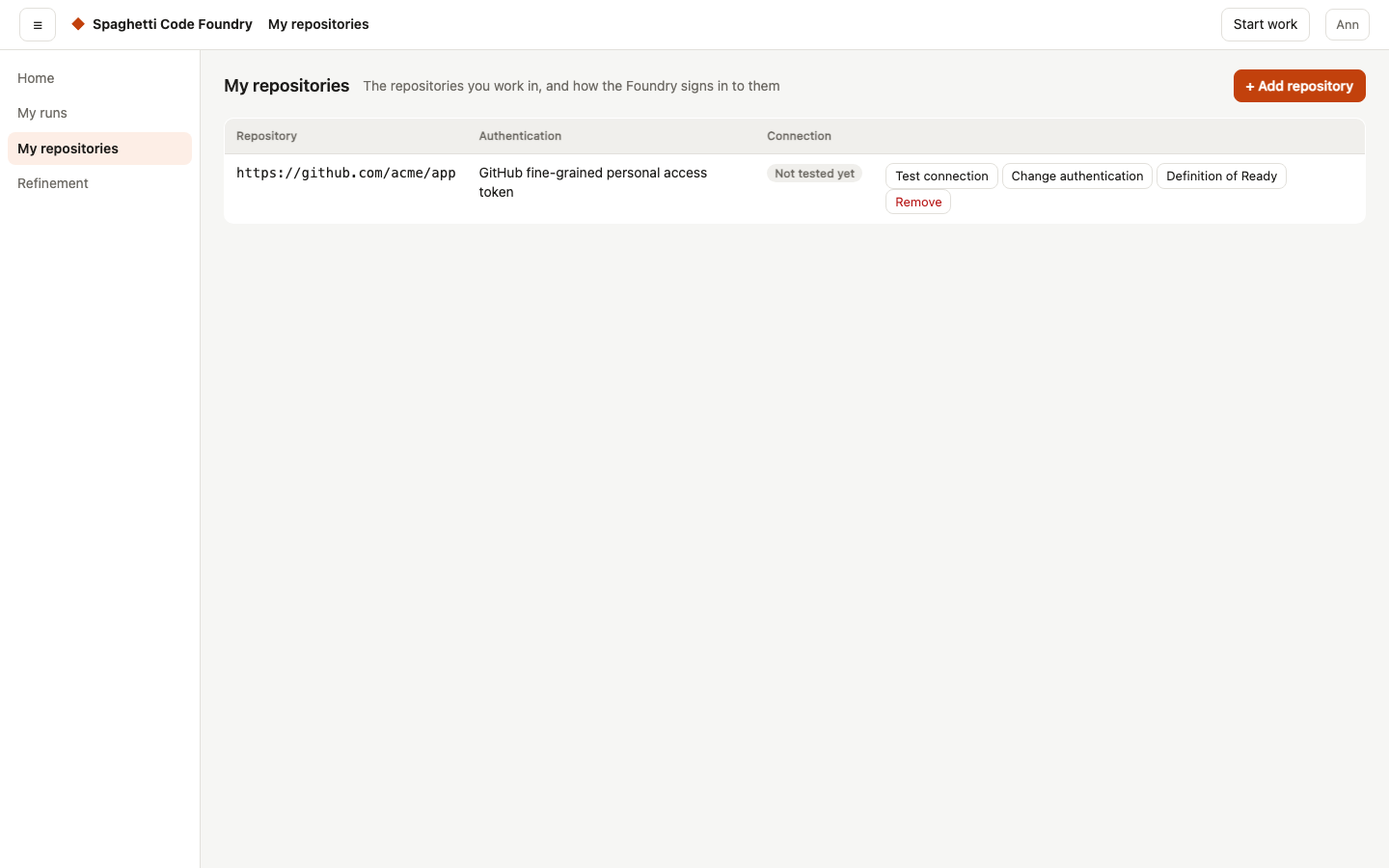
The My repositories page. #/repos is in the top bar for every account. It lists your repositories
with the URL, how the Foundry signs in (the authentication method) and the connection status, which is
"Not tested yet" until it is tested (see below). Add repository works in steps. Step 1 asks for the address; press Next. Steps 2 and 3 ask for the method and its details; Back returns to the address and keeps what you typed. Press Add repository to save. The Foundry then tests the connection by itself, and the dialog shows what it stored: the address, the method, the user name, the public key of a deploy key, the result of each check, and "A token is stored. It is never shown again." If the test fails, the repository is kept; press Test again, or Change details to enter new details. Press Done to close. The methods:
a GitHub fine-grained personal access token (give it these repository permissions, each "Read and write":
Contents, Issues and Pull requests), an HTTPS user name + token for other git hosts, an SSH deploy key, or
the GitHub App. The token is typed in a password field and is never shown again. Change authentication keeps the stored
token if you leave the token empty; a new method needs a new token. After Continue, a last step says what will be replaced or deleted; tick "Replace the current sign-in" and press Replace the sign-in. If a change fails and may still have been saved, the dialog reads the repository again and shows what is stored now. Remove asks first and deletes the
stored token or key too.
With GitHub App you need no token. It is offered only for a GitHub repository with an https address, and
only when the administrator has set up the app; otherwise the dialog says "GitHub App is not available: the
administrator has not set up the app (Settings → GitHub App)". The dialog shows Install the app on GitHub
(https://github.com/apps/<name>/installations/new). Install the app on this repository (choose "Only select
repositories" and pick it), then save; the connection is tested right after you save. When you save, the server looks up the
installation of the app on the repository and keeps its ID with the repository; if the app is not installed
there, it says so (409) and nothing is saved. The row keeps the link, to install the app on more repositories or
change which ones it may use. If the administrator removes the app, the row says "The administrator removed the
GitHub App" under its attention state; choose another authentication. Remove does not uninstall the app on GitHub.
With SSH deploy key you type the SSH address of the repository (git@host:path or ssh://…) and no
secret. The Foundry makes a key pair, keeps the private key and shows the public key in the
Authentication column, with Copy (it needs HTTPS or localhost; otherwise select the key and copy it
yourself). Add the public key in the settings of the repository as a deploy key with write access (on
GitHub: Settings → Deploy keys → Add deploy key, with "Allow write access"). Generate a new key makes
another pair after a confirmation; the old key stops working, so add the new public key and remove the old
one. When you change a repository with an https address to this method, the dialog also asks for its SSH
address; changing a deploy-key repository to a token method asks for an HTTPS address.
Errors from the server show in the dialog in plain words. A failed removal shows above the list, with
Try again when the server asks for it (an old key is still in the Keychain). A repository without a
method shows "Needs authentication" for a user. An admin can also choose "The server's own access". The page
has no per-repository settings. An admin sets them on the Repositories page.
The Repositories page (admin). An admin has one Repositories page with a switch: Mine (#/repos),
All (#/all-repos) and Credentials (#/credentials, see below); a user never gets All or Credentials. All lists the repositories of all accounts with the
Owner column (name and e-mail, "blocked" for a blocked owner, "Unknown account" when the account is gone), the
URL, the authentication method and the connection status ("Not tested yet" until the owner tests it). Rows with
a problem come first, then by owner and address. Besides the usual states, a row can say "Not on the app list"
or "Watcher problem". The next step offers Test connection, and Open shows the repository. There is no
+ Add repository on All. Settings, Definition of Ready, Transfer and the watchers are on the repository
view (#/repos/<id>): the sections Branches, Run settings and Watchers, and Transfer under
Dangerous actions. For a repository of another account you cannot change the authentication, remove it or
generate a new key; only the owner can. Three calls, all admin only: GET /api/admin/repos, PUT /api/admin/repos/<id>/settings and
POST /api/admin/repos/<id>/transfer {"email": …}.
- Settings per repository (Edit in the sections Branches and Run settings): the test command (one line, up to 500 characters), the docs to update (up to
50 paths, no leading
/,~or-, no..), the protected branches (up to 50 patterns), and the names of the main and the develop branch. Input is checked on the server: lengths, no control characters. Branch names follow git's rules, are at most 200 characters, and may not be@. In a pattern*matches any text and?matches one character;[…]is not allowed.{}clears the settings. - The settings are only stored and shown. Runs do not use them yet: the test command still comes from the
flow var
test_cmdand the protected branches fromprotected_branchesinconfig.yaml. They are never inGET /api/reposand never shown on My repositories. - Definition of Ready per repository: a short ordered list of checks a story must meet before it may go to
the backlog. Each item has an
idand atext. With nothing stored, a repository has the default list of seven items: the value is clear (who and why); it stands on its own or its dependencies are named; every acceptance criterion can be checked; it is small enough to build in one go; there are no open questions; it says what is out of scope; it contains no implementation plan. The default items also have a fixedrulekey that later parts use to pick the check; an item an admin adds has none.- Admin: Edit Definition of Ready in the section Run settings of the repository view opens a dialog: reword, add, remove,
move up or down, add a removed default item back, Back to the default, Save. The API is
PUT /api/admin/repos/<id>/ready {"items": [{"id"?, "text"}]};{"items": null}or the unchanged default list stores nothing. Limits: 1 to 20 items, each 1 to 200 characters on one line, no control characters, no two items with the same text, no unknown or repeatedid. A refusal is a 400 with one plain sentence. - Owner: My repositories shows the list read-only.
GET /api/repos/<id>/readyanswers{ items, isDefault }to the owner and to an admin; anyone else gets 404. - A transfer keeps the list; removing the repository removes it. It is only stored and shown for now: no story is checked against it yet.
- Admin: Edit Definition of Ready in the section Run settings of the repository view opens a dialog: reword, add, remove,
move up or down, add a removed default item back, Back to the default, Save. The API is
- Transfer moves a repository to another account, chosen by e-mail (any case). It is refused, with a plain message, when the e-mail is missing or not valid (400), no account has it (404), the account is blocked (409), or it already has 50 repositories (400). Afterwards the repository is in the new owner's list and no longer in the old one's, and its settings stay.
- Sign-in on transfer. A personal token (
github-token,https-token) is deleted and the method becomesnone. For a user that reads "Needs authentication"; for an admin it reads "The server's own access", like everynonerepository of an admin. The new owner sets the sign-in again. An SSH deploy key belongs to the repository, not to a person: it moves to the new owner with its public key, so the key that was added in the repository's settings keeps working (a missing key refuses the transfer with 409). A GitHub App installation is kept the same way: the method and the installation ID move with the repository (the connection status is cleared). The wipe of a token cannot be undone; transfer back and type the token again. - Queued and running runs of the old owner are not stopped.
The Credentials page (admin). #/credentials is the third scope of the admin's Repositories page (Credentials,
after Mine and All); a user never gets it. It is a table of the stored credentials of all accounts, sorted by
owner name and then by name, with Owner, Provider, Identity, Scope, Fingerprint, Created and Last used ("never" when
it was not used yet). Provider, Identity and Scope are those of the repository the credential belongs to (a credential
named repo:<id> of the same owner); a credential with no repository shows "No repository" and its own type and
name as identity. If the repository list cannot be loaded, the row says "Unavailable" and "Details unavailable
(…)", and Owner, Fingerprint, Created and Last used are still shown. Long fingerprints wrap. The owner shows
"deleted account" when the account is gone. It is for looking only: there is no add, change or remove button,
and no secret is ever sent. One call, admin only (a user gets 403): GET /api/admin/credentials.
If the store cannot be read, the call answers 500 with the same sentence as GET /api/credentials.
Repositories. Every account has its own list of GitHub repositories, kept in repos.json in
the data folder (mode 0600). A repository is a record: id, owner (account id), url, method
and added, and it may hold settings, which only an admin can read (GET /api/repos never has them).
A deploy-key record also has credentialId and publicKey. It never holds a secret (a public key is not
one). These calls manage it:
GET /api/reposlists your records, with thepublicKeyof a deploy key and theinstallationIdof a GitHub App record (a record with the methodgithub-apphas no credential). A GitHub record also hasgithub, itsowner/namein lower case without.git; so do the answers of adding and changing a record.GET /api/repos/methodsanswers{methods, githubApp}: the methods you may choose (noneonly for an admin,github-apponly when the app is set up) andgithubApp: {available: true, installUrl}or{available: false}. It never shows the app ID or the key path.- With
"method": "github-app",POST /api/reposandPUT /api/repos/<id>/authtake no token and no user name, and the installation ID is never read from the request. The server checks the request first (a request it refuses itself makes no call to GitHub), then asks GitHub for the installation. Answers: 400 when the app is not set up on this server, 409 when it is not installed on the repository, 500 when the app does not work (ask the administrator), 502 when GitHub cannot be asked. POST /api/repos {"url": …, "method": …, "username": …, "token": …}adds one (201; 409 if you or another account has it; 400 for a bad URL or method; at most 50).{"name": "owner/name"}still works.PUT /api/repos/<id>/authchanges the method, user name, token or address. What you do not give keeps its value. The old stored token is wiped. 404 for an id that is not yours.{"newKey": true}makes a new deploy key (only for the methodssh-deploy-key; 400 otherwise); the answer holds the newpublicKey.DELETE /api/repos/<id>removes the repository and its stored token or key (404 if it is not yours).DELETE /api/repos/<owner>/<name>removes a GitHub repository by name (the old form).
The URL is https://host/path, ssh://[user@]host[:port]/path or git@host:path; owner/name
means https://github.com/owner/name. Local paths, file:, ext:: and other transports, a user
name or password in the URL, and control characters give 400. The record keeps the address as you
wrote it (for example git@host:team/app.git stays that way). The same repository in another case,
with or without .git, or in https or ssh form counts as one repository. PUT …/auth may change the
address only to another form of the same repository.
Methods: github-token (a GitHub fine-grained token, only for https://github.com/…) and
https-token (a user name and a token, any https host). The token is stored in the credential store
as repo:<repository id>. none is the default without a method: the server's own access for an
admin, "needs authentication" for a user, who cannot choose it. If a repository's token is removed
with DELETE /api/credentials/<id>, set it again with PUT …/auth.
ssh-deploy-key works only with an SSH address (400 with "SSH address" in the message for https); it takes
no user name and no token. The Foundry makes an ed25519 pair with /usr/bin/ssh-keygen (no passphrase, no
comment) in a private temporary folder that is removed again. The private key is stored as the credential
repo:<repository id> of type ssh-key and never leaves the server; the record and GET /api/repos show
the publicKey. If ssh-keygen fails, the call answers 500 "the SSH key could not be made; see the server
log". If the key was removed with DELETE /api/credentials/<id>, generate a new key (PUT …/auth with
{"newKey": true}, or the method ssh-deploy-key again, which also repairs a missing or wrong credential).
If repos.json cannot be read, the calls answer "the repository list is not working; see the server log".
Which flows a user may start. A user starts a published flow by name (POST /api/runs
{"flow": "<name>", "task": "…", "vars": {…}}), never by yaml (403 "only an admin can run a
flow that is not saved") and never in a folder of their choice (403 "only an admin can choose
the folder"). A flow is published when its publish: section has enabled: true (see "The
editor"). Built-in flows are not published; save a copy and publish it. After an upgrade users
see no flows until you publish some. An unpublished flow answers 404.
GET /api/flows shows a user the published, valid flows as {name, title, description,
version, usesTask, fields}. usesTask is true when a step reads the task ({{task}},
FACTORY_TASK or SCF_TASK); the Start work page shows a Task box only when it is not false. The built-in issue-plan and issue-gitflow read the task in their planning steps: what you type reaches the planner on top of the issue, and it may be left empty. fields lists the variables that are fixed (shown with their value) or
user fills in (with label, help text, default and whether it is required); hidden variables
are not listed. In vars a user may set only the inputs (403 you cannot set the var "<name>"
for any other). A required input that is empty gives 400 fill in "<label>". Hidden and fixed
variables keep the value of the flow or of the folder's own settings.
If the flow uses github_repo, it must be one of the user's repositories: when it is an input,
give it in vars (403 "<name>" is not one of your repositories). When none is given and the
flow or the folder's own settings name a repository that is not the user's, the answer is 403
set the var "github_repo" to one of your repositories (or, when github_repo is not an input,
this flow works on a repository that is not one of yours). A flow without github_repo runs
in the server's default folder. A user's run keeps the variables it had when it was queued.
Versions. Each save of a published flow sets publish.version: 1 the first time, then one
more for each change (compared with every same-named copy, in all places). Saving it unchanged
keeps the number; turning the flow off and on again raises it. A run keeps the flow it started
with, even if you save a new version while it waits, and the run page shows "Flow version". If
you edit a flow file by hand, raise the number yourself.
Trust. Roles limit the API and the pages. They do not fully limit what a run can do. The
server's GitHub login is not put into a user's run. On macOS, every step of a user's run, shell and
agent, is held by a sandbox profile: it cannot read your Mac account's files, the Keychain or the
agent login, and it writes only in its own run folder. Agent steps sign in by a token variable you
set for the server: CLAUDE_CODE_OAUTH_TOKEN, ANTHROPIC_API_KEY or ANTHROPIC_AUTH_TOKEN for
Claude; OPENAI_API_KEY or CODEX_API_KEY for Codex; the provider's api_key_env for a compatible
provider. A local model needs none. Without one the step is refused. Each run has its own empty
agent folders, so your agent settings, MCP servers and skills do not reach it. The agent's shell tool
can see the token. The limits are in docs/THREAT_MODEL.md (SR-O1): macOS only, and with
sandbox.user_runs: off nothing is held. To switch user runs off, change the rule POST runs to
no in src/server/permissions.ts.
Security rules for published flows. A published flow is code that users steer with text. Keep to these rules:
- Never paste user text into a shell command: no
{{vars.<input>}}and no bare{{vars}}. Read"$FACTORY_VAR_NAME"and"$FACTORY_TASK", always in quotes. - Never
evalorsh -ca value users fill in. Do not publishtest_cmdoragent_envas an input. - For users' repositories use
workspace: emptyand clone in arepo_accessstep.worktreeis a branch of the server's own folder, so it is refused for users, likeinplace. Only admins can run those flows. - Give agent steps only the tools they need. The task and the issue text are untrusted instructions.
- Keep secrets out of
vars. Hidden variables are not secret from the run itself.
The flow editor refuses {{vars}} in a shell run and agent_env as an input when you save a
flow that has a user input. from on resume is for admins only; a user gets 403. A user's run of an
inplace or worktree flow fails before any step ("This flow works in a branch of the server's
folder, so only an admin can run it." for worktree), the flow is not listed for users, and starting
it gives 403. A user also gets 403 for the diff of an inplace run. The server's own git calls for
a workspace ignore hooks, fsmonitor and the global git settings. A user's run without github_repo keeps its learnings in a file of its own account. What is
protected and what is still open is in docs/THREAT_MODEL.md.
After an upgrade. Existing accounts with the role user lose access to everything but Refinement, Runs and My repositories.
Change a role with scf user role <e-mail> admin|user, or create an admin with
scf user create --admin under another e-mail.
The table. An admin may make every call.
| Call | Admin | User | What it does |
|---|---|---|---|
GET /api/info | yes | no | server settings and today's cost |
GET /api/config | yes | no | read the settings from config.yaml; the X-Config-Version header names this version of the file. The Slack webhook is not returned: notify.slack_webhook_set says whether one is set |
PUT /api/config | yes | no | change the settings. With an X-Config-Version header from a read, a stale version is refused with 409 (reload first); the answer carries the new version. Without the header nothing is checked. A notify.slack_webhook left out keeps the stored webhook; null removes it; a string sets it. A broken config.yaml answers 400 with the line number. A refused save answers 400 and lists its problems as issues (path, message; at most 50) next to error |
GET /api/settings | yes | no | the description of the settings (label, help, kind, range, default, when a change takes effect) and the start-up settings with their values; no secret |
POST /api/settings/reset | yes | no | remove one described setting from config.yaml so it takes its default (a parent left empty goes too; comments above it stay). With an X-Config-Version header a stale version is refused with 409; the answer carries the new version and removed |
GET /api/restart | yes | no | which saved settings need a restart, whether the server can restart itself, and whether a restart waits (why, since when, active runs) |
POST /api/restart | yes | no | restart when no story is running: no new runs start and the watchers stop until the active runs are done; only when the server runs under the supervisor; writes an audit line |
DELETE /api/restart | yes | no | cancel a restart asked for after a settings change: runs and watchers start again; writes an audit line |
GET /api/watchers | yes | no | list the watchers |
POST /api/watchers/:id/tick | yes | no | run a watcher now |
GET /api/monitor | yes | no | whether the monitor makes bug stories (on, off, quiet after a restart, or stopped by the circuit breaker), when it last checked, how many stories it made today, its findings with their states, its detectors and its mutes, and the monitor's settings with their ranges, defaults, values and whether config.yaml states them |
GET /api/monitor/findings/:id | yes | no | the evidence, bug stories and runs of one finding of the monitor |
POST /api/monitor/story | yes | no | make the bug story of one finding of the monitor now (the waiting rules do not apply; the off switch, mutes and the two tries do) |
POST /api/monitor/off | yes | no | stop the monitor from making bug stories |
POST /api/monitor/on | yes | no | let the monitor make bug stories again |
POST /api/monitor/mutes | yes | no | mute one detector or one finding of the monitor, with a reason, for a time or for good |
DELETE /api/monitor/mutes/:id | yes | no | end a mute |
POST /api/monitor/retry | yes | no | let the monitor try again for a finding that waits for a person (two bug stories did not fix it) |
POST /api/clean | yes | no | clean up old runs |
GET /api/providers | yes | no | agent providers |
POST /api/providers/test | yes | no | test a provider |
GET /api/evals | yes | no | eval reports |
GET /api/stats | yes | no | statistics |
GET /api/flows | yes | yes | list flows (a user sees the published flows only; an admin gets that list with ?published=1) |
GET /api/flows/:name | yes | no | read a flow |
PUT /api/flows/:name | yes | no | save a flow |
DELETE /api/flows/:name | yes | no | delete a flow |
GET /api/blocks | yes | no | list blocks |
PUT /api/blocks/:id | yes | no | save a block |
DELETE /api/blocks/:id | yes | no | delete a block |
POST /api/validate | yes | no | check a flow; answers { ok, flow } or { ok: false, error, issues } (issues is [{ path, message }], empty for a YAML syntax error) |
POST /api/generate | yes | no | write a flow with AI |
GET /api/queue | yes | yes | the queue (a user sees their own queued runs and how many are ahead) |
GET /api/runs | yes | yes | list runs that are not archived (a user sees their own); ?archived=1 lists the archived ones; q, repo, flow, status and since narrow the list before the 200-run cap |
GET /api/run-owners | yes | no | the accounts that have runs, for the owner filter |
GET /api/run-filters | yes | yes | the repositories and flows of the runs you can see, for the filter menus |
POST /api/runs | yes | yes | start a run (a user: a published flow and own repositories; an admin with likeUser: true follows the same rules) |
GET /api/runs/:id | yes | own runs | read a run (a user: without costs and setup) |
POST /api/runs/:id/cancel | yes | own runs | cancel a run that runs, is queued, waits or is stopped |
POST /api/runs/:id/archive | yes | own runs | archive a finished run: it leaves the list of runs (GET /api/runs?archived=1 lists the archived ones); nothing is deleted |
POST /api/runs/:id/unarchive | yes | own runs | take a run out of the archive again |
POST /api/runs/:id/resume | yes | own runs | resume a run (an architect run: ask again from its refinement session); 409 when its issue is closed on GitHub (see "A run of a closed issue" in chapter 3) |
POST /api/runs/:id/answer | yes | own runs | answer the questions a run stopped with; the run continues with the answer |
POST /api/runs/:id/approve | yes | own runs | approve a run, with a note; 409 for a closed issue, as for resume |
POST /api/runs/:id/reject | yes | own runs | reject a run, with a note; 409 for a closed issue, as for resume |
GET /api/runs/:id/events | yes | own runs | follow a run live (a user: without costs and setup) |
GET /api/runs/:id/diff | yes | own runs | the changes of a run |
GET /api/runs/:id/evidence | yes | own runs | the evidence of a run: its manifest, whether it still verifies, and the hashes of the files it names (never their content; a user: without models, policies and account ids); state is not_available for a run without a manifest |
GET /api/runs/:id/transcript/:n | yes | no | the transcript of a step |
GET /api/next | yes | no | what happens next, for all runs |
GET /api/health | yes | no | server health |
GET /api/board | yes | no | the board of all work |
GET /api/search | yes | yes | find runs, repositories, refinement sessions and flows by text or id (a user: their own and the flows they can start; an admin: all accounts and the board's issues) |
GET /api/since | yes | no | what changed since a time |
GET /api/your-turn | yes | no | what waits for you |
POST /api/your-turn/dismiss | yes | no | dismiss an item |
POST /api/your-turn/restore | yes | no | restore dismissed items; with { "key": "…" } only that item |
GET /api/your-turn/detail | yes | no | the questions, plan or split of an item |
POST /api/your-turn/act | yes | no | answer, approve, reject or retry an item, as a comment on the issue; retry of a closed issue is 409, as for resume |
GET /api/clarity | yes | no | how long items waited for you, and what Your turn missed |
POST /api/password | yes | yes | change your own password (the other sessions of the account end) |
GET /api/credentials | yes | yes | your stored credentials |
POST /api/credentials | yes | yes | store a credential |
DELETE /api/credentials/:id | yes | yes | remove a credential |
GET /api/users | yes | no | list the accounts |
GET /api/users/limits | yes | no | the default limits for all accounts and the overrides per account (all three are enforced) |
PUT /api/users/limits | yes | no | set or clear the default limits: runs at the same time, runs per day, daily budget in USD (null clears one) |
POST /api/users | yes | no | add an account without a password; the answer has its one-time set-password token |
PUT /api/users/:id | yes | no | change the name, e-mail or role of an account |
PUT /api/users/:id/limits | yes | no | set or clear the limits of one account; a cleared one follows the default again |
POST /api/users/:id/block | yes | no | block an account, end its sessions and cancel its queued jobs |
POST /api/users/:id/unblock | yes | no | unblock an account |
POST /api/users/:id/link | yes | no | a new set-password token for an account without a password |
POST /api/users/:id/reset | yes | no | take the password of an account away, end its sessions and give a one-time set-password token |
POST /api/users/:id/unlock | yes | no | remove the lock after too many wrong tries (a short wait for the address can remain) |
GET /api/users/:id/app-repos | yes | no | the repositories an account may connect through the GitHub App |
PUT /api/users/:id/app-repos | yes | no | set the repositories an account may connect through the GitHub App (owner/name or owner/*); an empty list allows none |
DELETE /api/users/:id | yes | no | delete an account with its sessions, repositories, refinement sessions, Ask SCF conversations and stored credentials |
GET /api/skills/lifecycle | yes | no | the skill versions that are deprecated, quarantined, retired or revoked (a release revocation wins over a local state), and a problem when the lifecycle record cannot be read |
POST /api/skills/lifecycle | yes | no | set the lifecycle state of one approved or built-in skill version (key, state, reason, optional replacement); the answer has the transition and the lockedRuns; a revoked version never changes again (409) |
POST /api/skills/lifecycle/allow-run | yes | no | let one run go on with a quarantined skill version (runId, key, reason); 409 for a revoked version or a run that does not lock it; resume the run afterwards |
GET /api/audit | yes | no | read the audit log, newest first, with filters |
GET /api/audit/export | yes | no | download the audit log as CSV, with the same filters |
GET /api/repos | yes | yes | your repositories |
GET /api/repos/methods | yes | yes | the sign-in methods you may choose, and the link to install the GitHub App |
POST /api/repos | yes | yes | add a repository (a URL, and a token or a deploy key for it) |
PUT /api/repos/:id/auth | yes | yes | change the method, user name, token or address of your repository, or make a new deploy key |
POST /api/repos/:id/test | yes | yes | test the connection of your repository (an admin: any repository); the result is saved as its connection status |
GET /api/repos/:id/ready | yes | yes | the Definition of Ready of your repository (an admin: any repository) |
GET /api/repos/:id/epics | yes | yes | the epics of your repository with counts, growth, the expected finish and what holds each up, from what the watchers saved (no call to GitHub); saves the day's forecast (an admin: any repository) |
GET /api/repos/:id/epics/:issue | yes | yes | one epic of your repository: its stories in build order, chains and critical path, the series per day, the pace, the median story time and the forecast per day (an admin: any repository) |
DELETE /api/repos/:id | yes | yes | remove your repository and its stored token or key |
DELETE /api/repos/:owner/:name | yes | yes | remove a GitHub repository by name (old form) |
GET /api/admin/repos | yes | no | the repositories of all accounts, with their settings |
PUT /api/admin/repos/:id/settings | yes | no | set the test command, docs, protected branches and branch names of a repository |
PUT /api/admin/repos/:id/ready | yes | no | set the Definition of Ready of a repository, or put the default list back |
POST /api/admin/repos/:id/transfer | yes | no | move a repository to another account, by e-mail |
GET /api/admin/repos/:id/watchers | yes | no | the watchers of a repository, with status and holds |
POST /api/admin/repos/:id/watchers | yes | no | add a watcher to a repository (GitHub, with a sign-in that can call the GitHub API) |
PUT /api/admin/repos/:id/watchers/:wid | yes | no | change a watcher of a repository, or enable or disable it |
DELETE /api/admin/repos/:id/watchers/:wid | yes | no | delete a watcher of a repository |
POST /api/admin/view-as | yes | no | start a read-only view of one user's display for 30 minutes (GET calls with ?as=<id> are then answered as for that user); writes an audit line |
DELETE /api/admin/view-as | yes | no | end the view of a user's display |
GET /api/admin/credentials | yes | no | the stored credentials of all accounts, without any secret |
GET /api/refinement | yes | yes | your refinement sessions and the repositories a new one can use (an admin: the sessions of all accounts, with the owner) |
POST /api/refinement | yes | yes | start a refinement session on one of your GitHub repositories, from an idea or from an open issue of it (read with the repository's sign-in; 409 when the Foundry is building or has built the issue, or you have an open session for it) |
GET /api/refinement/backlog | yes | yes | the open issues of one of your GitHub repositories (?repo=owner/name) that the Foundry is not building and has not built, newest first, each with four checks done by code: acceptance criteria, value sentence, "Depends on" issues exist, no open questions; read with the repository's sign-in; GitHub's newest 100 issues and pull requests are read, and cut says when that page was full so older open issues may be missing; no architect run starts and nothing is written (an admin who is not the owner: 403) |
GET /api/refinement/:id | yes | yes | read your refinement session, with the architect's brief and state and the talk (an admin: any session) |
PUT /api/refinement/:id | yes | yes | rename your refinement session |
POST /api/refinement/:id/drop | yes | yes | drop your refinement session (an admin: any session); it is removed after 30 days, and its architect run is cancelled |
POST /api/refinement/:id/restore | yes | yes | restore your dropped refinement session |
POST /api/refinement/:id/source/remove-build-label | yes | yes | remove the build label from the issue your refinement session came from, with the repository's sign-in (an admin who is not the owner: 403) |
POST /api/refinement/:id/architect | yes | yes | ask the architect to read the repository for your refinement session, or resume a paused read (one read per account at a time) |
POST /api/refinement/:id/round | yes | yes | ask the architect for a round of questions in your refinement session, or resume a paused round (one architect run per account at a time) |
POST /api/refinement/:id/ask | yes | yes | ask the architect a question of your own in your refinement session, or resume a paused answer (one architect run per account at a time) |
POST /api/refinement/:id/questions/:qid/answer | yes | yes | answer a question of the architect in your refinement session: an option, your own text, or "I don't know yet" |
POST /api/refinement/:id/proposals/:pid/accept | yes | yes | accept a proposed entry of your refinement session: it goes into its rules, examples or open questions |
POST /api/refinement/:id/proposals/:pid/reject | yes | yes | reject a proposed entry of your refinement session; it is removed |
PUT /api/refinement/:id/map/:eid | yes | yes | change the text of a rule, example or open question of your refinement session |
DELETE /api/refinement/:id/map/:eid | yes | yes | remove a rule, example or open question from your refinement session |
POST /api/refinement/:id/drafts | yes | yes | add an empty story draft to your refinement session (at most 20) |
PUT /api/refinement/:id/drafts/:did | yes | yes | save what you typed in a story draft of your refinement session; only the fields in the body change |
DELETE /api/refinement/:id/drafts/:did | yes | yes | remove a story draft from your refinement session |
POST /api/refinement/:id/drafts/:did/suggest | yes | yes | ask the architect for a suggestion for one field of a story draft of your refinement session, or resume a paused one (one architect run per account at a time) |
POST /api/refinement/:id/drafts/:did/review | yes | yes | ask the architect to review a story draft of your refinement session, or resume a paused review (one architect run per account at a time); no field changes |
POST /api/refinement/:id/publish | yes | yes | publish the ready story drafts of your refinement session as GitHub issues, with the repository's sign-in; a draft that has an issue is not created again, a split original is skipped, and leftBehind names split originals that still hold criteria; in a session that came from an issue, the draft that stands for it replaces the title and text of that issue first (one comment holds the old text, labels are added and kept) and is answered as updated, and a closed issue or one the Foundry builds is refused (409) with nothing written; when the issue's title or text changed on GitHub since the session read it, nothing is written and the answer is 409 with changedOnGithub (both versions and seen): send source: { keep: "mine" | "github", seen } to choose; a split source issue is replaced once all its parts are on GitHub (the issues that depend on it get the parts under "Depends on" and a comment with the old and new text, every trigger label of an issues watcher of the repository is taken off it, and it gets a comment naming the parts; it is then closed as not planned; it stays open, to be closed by hand, when more than 1,000 open issues were read, a dependant must be changed or checked by hand, or it is a story of the monitor, and an original closed in another way is left so) and the answer has replaced: { issue, parts, dependants: [{ issue, outcome }], closed: "not_planned" | "other" | "open", closedAt? }; an original that the Foundry builds is refused (409) before the first write, and so is a closed one unless its replacement had started already (it is then left closed), and a failed publish is finished by publishing again (an admin who is not the owner: 403) |
PUT /api/refinement/:id/drafts/:did/review-label | yes | yes | choose whether a story draft of your refinement session gets the review label when it is published; nothing is sent to GitHub |
POST /api/refinement/:id/drafts/:did/split | yes | yes | ask the architect for ways to split a story draft of your refinement session, with an optional way of your own, or resume a paused one (one architect run per account at a time); nothing is split and no field changes |
POST /api/refinement/:id/drafts/:did/split/confirm | yes | yes | confirm a split of a story draft of your refinement session: each part becomes a new draft and the original is kept as a record; no architect run starts |
POST /api/refinement/:id/drafts/:did/criteria/:cid/move | yes | yes | move an acceptance criterion between a split story draft of your refinement session and its parts, or between two parts |
POST /api/refinement/:id/drafts/:did/merge | yes | yes | merge another story draft of your refinement session into this one; the other draft is removed and no architect run starts |
POST /api/refinement/:id/drafts/:did/impact | yes | yes | ask the architect what a story draft of your refinement session touches, how risky it is and how big it is, or resume a paused one (one architect run per account at a time); no field changes |
POST /api/refinement/:id/drafts/:did/move-to-notes | yes | yes | move a text of a story draft of your refinement session that has a plan or how remark to the notes for the builder, as a wish |
POST /api/refinement/:id/drafts/:did/ready-check | yes | yes | check a story draft of your refinement session against the Definition of Ready of its repository: by code, and the architect judges what code cannot decide, or resume a paused check (one architect run per account at a time); no field changes |
POST /api/refinement/:id/drafts/:did/ready/:item/accept | yes | yes | accept an item of the Definition of Ready anyway for a story draft of your refinement session, with a reason; not for the implementation plan item |
DELETE /api/refinement/:id/drafts/:did/ready/:item/accept | yes | yes | remove the "accepted anyway" mark of an item from a story draft of your refinement session |
POST /api/refinement/:id/drafts/:did/suggestions/:sid/accept | yes | yes | accept a suggestion of the architect for a story draft of your refinement session, as it is or with your own text; it goes into the draft |
POST /api/refinement/:id/drafts/:did/suggestions/:sid/reject | yes | yes | reject a suggestion for a story draft of your refinement session, with an optional reason; it is removed |
PUT /api/refinement/:id/epic | yes | yes | set or clear the Epic of your refinement session |
GET /api/refinement/:id/publish | yes | yes | read the publish plan of your refinement session: the issues that would be created, their order, labels and dependencies (a split original is not listed: its parts are, and a draft that depended on the original depends on each part; leftBehind: [{ draft, title, criteria }] names split originals that still hold criteria, and is left out when there are none); an item with updates: N replaces issue #N of the session's source and is in willUpdate, not in willCreate, and notChanged: N says no draft stands for that issue, replaces: { issue, parts, ready, cut?, staysOpen?, dependants } says the issue was split and a publish will replace it by its parts, with the open issues that depend on it (before and after of their Depends on text, or byHand); staysOpen says the issue gets the comment but is not closed, and changedOnGithub is set when the issue it would update changed on GitHub; it reads the labels, the issue and the open issues from GitHub with the repository's sign-in and creates nothing (an admin who is not the owner: 403) |
GET /api/help/conversations | yes | yes | your Ask SCF conversations, last changed first, without their messages (?archived=1: the archived ones), whether Ask SCF is switched on and whether it is paused (then you can read but not ask), and the limits; only your own, for an admin too, and not in a view of a user's display |
GET /api/help/conversations/:id | yes | yes | read one of your Ask SCF conversations with its messages; a conversation of another account answers 404 like an unknown one, a deleted one 410 |
POST /api/help/conversations/:id/complete | yes | yes | close one of your Ask SCF conversations: it stays readable and takes no new question |
POST /api/help/conversations/:id/feedback | yes | yes | rate an answer in one of your Ask SCF conversations: helpful or not helpful, with optional reasons from a fixed list and no free text; vote null (or none) takes it back; only counts are kept in the quality numbers; works while Ask SCF is paused |
POST /api/help/conversations/:id/archive | yes | yes | move one of your Ask SCF conversations to the archive |
POST /api/help/conversations/:id/restore | yes | yes | take one of your Ask SCF conversations out of the archive; it gets the state it had |
DELETE /api/help/conversations/:id | yes | yes | delete one of your Ask SCF conversations: its title and messages are removed at once and cannot be brought back |
POST /api/help/conversations | yes | yes | ask Ask SCF a question in a new conversation (question, and optionally context: the page and one selected thing); answers 202 with the conversation, whose reply is pending until the turn ends; one turn per account at a time (409), 429 when the queue is full or your turns of today are used, 503 while Ask SCF is switched off |
POST /api/help/conversations/:id/messages | yes | yes | ask the next question in one of your Ask SCF conversations; the same answers as for a new one |
POST /api/help/conversations/:id/retry | yes | yes | try the failed or stopped last answer of one of your Ask SCF conversations again; no message is added, and it counts as a turn of today |
POST /api/help/conversations/:id/cancel | yes | yes | stop the answer that is being written in one of your Ask SCF conversations |
POST /api/help/conversations/:id/actions | yes | yes | follow an offer of an Ask SCF reply (message, offer): the server checks again that you may open its page and answers {type, to}, or runs a read-only check (read it again, test the connection) and stores its result as a check message of the conversation, answering {type, outcome, conversation}; 404 when the thing is gone or you can no longer see it, 403 when you may not do it now, 409 when the conversation is not open, is waiting, is full, changed while the check ran, or already runs a check, 410 for a deleted conversation. Or see what an action Ask SCF proposed in one of your answers would do (message, index): the server describes it in its own words and gives a confirmation token that works once for 5 minutes; nothing changes. 503 while Ask SCF or its actions are switched off |
POST /api/help/conversations/:id/actions/confirm | yes | yes | carry out a previewed action with its token (token, message, index): the server checks the token, that the run did not change since the preview, the settings, your account and the rule of the same button on the run's page (your own runs only, an admin too), then reads the result back from the run and answers { outcome, stored }; 409 for a token that is used, expired or does not fit, or a run that changed; writes an audit line |
POST /api/help/conversations/:id/actions/cancel | yes | yes | drop the confirmation token of a preview (token); nothing changes |
GET /api/help/conversations/:id/handoffs | yes | yes | the pages you may take one answer of your Ask SCF conversation to (?message=), with what each would copy; checked again for your account now; nothing is written |
POST /api/help/conversations/:id/handoffs | yes | yes | record that you took an answer of your Ask SCF conversation to another page (message, offer, and the page and fill you saw); only the conversation changes, never the target; 409 when the offer, its page or what it copies changed |
POST /api/help/context | yes | yes | what Ask SCF would take from a page context, before you send it with a question: the envelope as it would be kept (the page, the selected things, the filters, the marked text; what is too much is cut and named), its size and the limits, the page it is for your role, and the things on it that the server finds for your account; a thing that does not exist and one you may not see are only counted together; nothing is stored and no model is called; 400 for a context that holds anything else, 503 while Ask SCF is switched off |
GET /api/help/export | yes | yes | all your Ask SCF conversations with their messages, as one JSON document to keep (also the archived ones; not the deleted ones); only your own, for an admin too; writes an audit line without any text of a conversation |
GET /api/help/usage | yes | no | Ask SCF for administrators: whether it is on, the provider and model that answer (or why none can), the limits, the rollout stage (off, paused, administrators, pilot, everyone), what runs and waits now, turns, failures, cost and tokens per account and day, and the quality numbers (daily counts of answers, failures, limits, sources, votes and latency buckets, with no account); no question and no answer |
What comes later. Pages for users (starting runs).