3. Follow, approve and resume runs
Home#
Home is the first page. The top shows the counts (for example "2 need you · 1 active") and one button, the best next step: the first thing that needs you, then a problem, then a run that is active, else Start work.
- Needs you: the same list as Your turn.
- Active: work that is running or queued. Each row says what happens next.
- Problems (admin): problems of the Foundry that Needs you does not already show.
- Recently completed: closed until you open it.
- Metrics (admin): closed until you open it; a link goes to the Dashboard (Administration → Dashboard).
- Each row: one main button and a Details link to the run. A section shows 5 rows and "+n more".
- Empty and all clear: with nothing yet, Home offers Start work; when nothing needs you it says "Nothing needs you."
- Users see only their own work: no cost, model, health or other accounts.
Home asks again every 30 seconds.
Messages and confirmations. After an action a short message appears and goes after a few seconds. An error message stays until you close it with ✕. A screen reader reads each message once. Anything you must still do stays on the page, not in a message. A dangerous action asks first in a dialog where focus starts on Cancel; Escape cancels. Dismiss on Home and Drop in Refinement show Undo in the message. Undo on Home brings back only the item you dismissed. Undo stays until you use it, close it or another message replaces it. A dropped session shows Undo only when it is yours.
Repository pages. My repositories, All repositories and Credentials show a grey table while they load. If they cannot load, you see what went wrong and Retry; without permission you see that instead. If the list cannot be loaded again after an action, the old list stays with a note and Retry. If the sign-in methods cannot be loaded, the list still shows, with a note that you cannot add a repository now. A failed connection test stays on the row ("Connection failed" with the reason) until the next test, and the button reads Test again. After you add a deploy-key repository, a note on the page asks you to add the public key as a deploy key on GitHub; it stays until the connection works. Remove and Generate a new key ask first in a dialog. Add repository runs in steps and tests the connection after saving; Change authentication asks you to confirm. A read-only preview shows no action buttons. Rows on My repositories. Each row shows the short name (owner/name, or the address), how the Foundry signs in, whether it is Connected, Failed or Not tested yet, when it was last checked and how many runs are running or waiting for it ("—" if that cannot be read). A row has at most one thing to do, shown as one button: change the authentication (an account that needs a sign-in), install the GitHub App again, or test the connection (after a failed or missing test; a failed test also shows its first message). Repositories that need attention come first, and a line above the table says how many. From 8 repositories a filter box narrows the list by address. Compact rows makes the rows smaller; the browser remembers it. Long names are cut, with the full text on hover. No secret is shown. One repository. Open on a row (or #/repos/<id>) opens the page of that repository, in both displays. It has three sections. Overview: name, address, the attention state and next action (as on the row), active runs, the date it was added and Definition of Ready (read-only). Connection: the method, the user name if there is one, the same Provider, Identity and Scope as everywhere (see "Provider, identity and scope" below), the public key with Copy and the deploy-key hint (deploy key), or the install link (GitHub App); the last test with every check (Read, Write, GitHub API) and its message; and the buttons Test connection and Change authentication. Dangerous actions, last and set apart: Generate a new key (deploy key only) and Remove. Each asks first and names the repository and what is deleted. While one action runs, the other buttons are disabled. An unknown repository, or one of another account, shows "No such repository." with a link back. A read-only preview shows the sections without buttons. The breadcrumb names the repository; Back goes to the list. A row no longer shows the public key, so open the repository to copy it after you add a deploy-key repository.
Refinement pages. The session list and a session show a grey skeleton while they load. If they cannot load, you see what went wrong and Retry; a session that is not found and a missing permission are shown as their own messages. A session refreshes by itself; a refresh that fails keeps what you see and says "Could not refresh. Showing data from …" with Retry. A refresh never replaces a field you are typing in or that has unsaved text. While the architect works, the page says so once. Each field shows whether it is saving, saved or failed; a failed save keeps your text and has Retry. If a publish creates some issues and fails for the rest, a banner lists both and has Retry for the rest; it stays until the rest is published or removed. A draft that was split can no longer be changed: you see a message with a link to each part, and your text is kept. Removing a draft, moving text to the notes, merging, publishing with text that is not saved, removing a reason, replacing a field with a suggestion, removing a map entry and dropping a session ask first in a dialog.
Your turn#
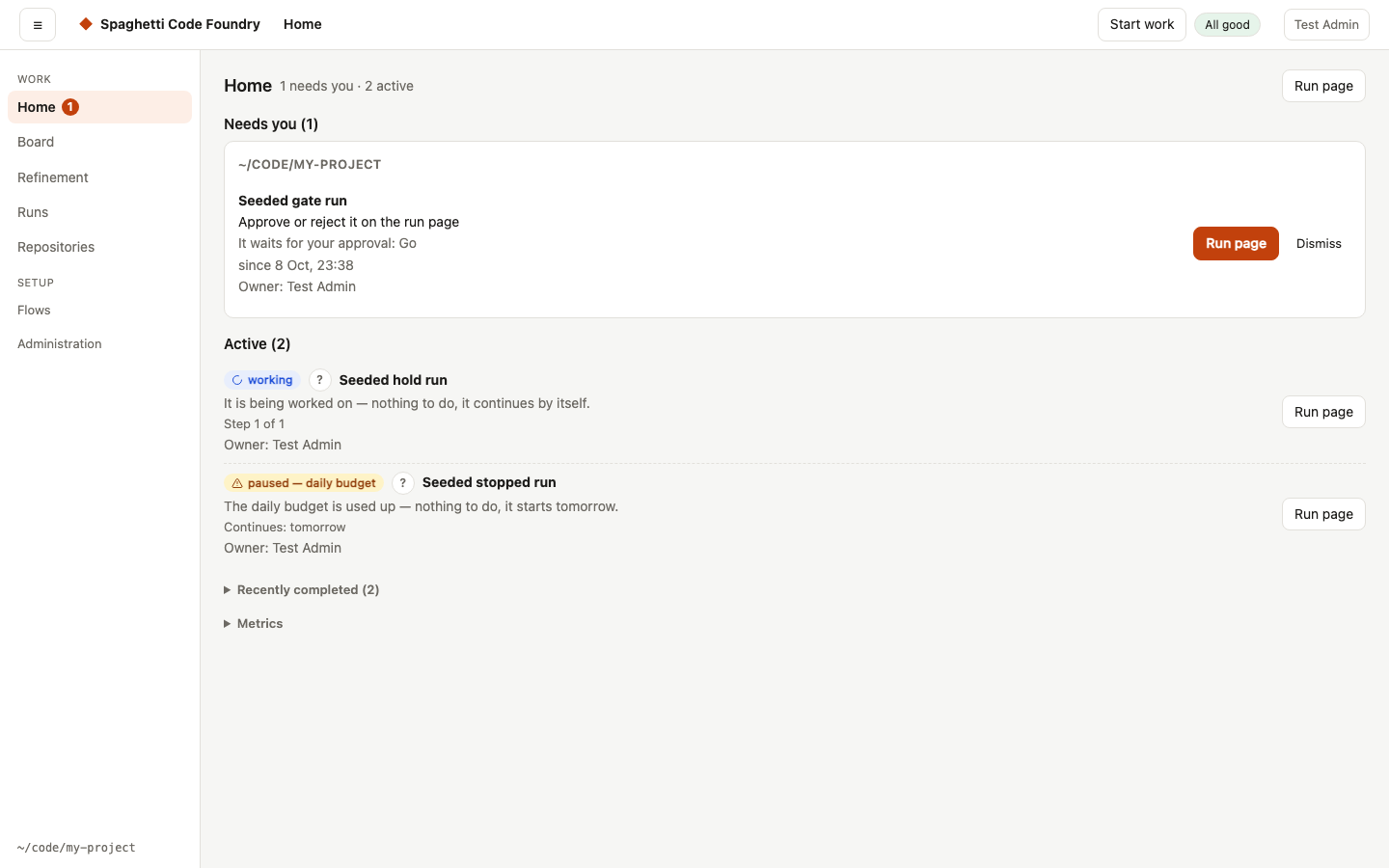
Your turn lists only what waits for you, one button each: questions to answer, approvals, failed or stopped work, a release pull request to merge, and a watcher that has an error. It never lists work that is running, queued, paused by a limit or waiting for another story, and never evaluation runs.
- The monitor: admins also see an item when the circuit breaker stopped bug stories, and one item per finding that needs a person (two bug stories did not fix it). That item shows the sentence, the evidence and links to the two stories. It cannot be dismissed; it goes when you press Try again or mute the finding on the Watchers page (Administration → Watchers; see "Two tries, then a person").
- Owner (admins): an item that has a run shows the owner's name,
deleted userwhen the account is gone, and nothing otherwise. Users see no owner name. - Order: the item that holds back the most stories comes first, then the one that waits longest. Items are grouped by repository.
- Each item: what it is, why it waits, the action, and since when. The button opens the place to do it (GitHub in a new tab, or the run page).
- Runs you started yourself (UI or
scf run) count when they wait for approval, at any age, or when they failed or stopped in the last 7 days. Failed release, CI-fix and review runs started by a watcher show the same way. Runs of older versions have no record of who started them and are treated like watcher runs. - Answer and approve here: for an item of a watcher, buttons next to the GitHub link do the work. Show questions has Accept all recommendations (only for questions asked up front) and Answer… (a box per question; each needs an answer, and Use recommendation fills one in visibly). Show plan, Show split and Show request show the risk and Approve / Reject (say what to change). A failed item has Retry and Retry with a hint…. Each action is a normal comment on the issue under the Foundry's GitHub login, signed with your name, so replying on GitHub still works. Approve and reject need write access for that login. The item then shows under Done — continuing.
- Dismiss hides an item. It stays hidden until its situation changes (a new question, a new approval, a new failure). Show again at the bottom brings all dismissed items back. Watcher errors cannot be dismissed. Dismissals are kept in
your-turn.jsonin the data folder. - No refresh needed: the page updates every 5 seconds. When you come back from a GitHub link, the watcher checks GitHub at once. An answer you give elsewhere shows at the next watcher check.
- Closed on GitHub, run still working: such an issue is listed, with a link to the run (the Runs page while the run is only queued). Cancel the run if the work is no longer wanted, or Dismiss it to let the run finish.
- Closed issues: a failed, stopped, waiting or cancelled run of an issue that is closed on GitHub is not listed, not counted, not a card on the Board and not in the failed list of "since", and nothing is sent for it. This holds for every run, whoever started it, except a run that closed its own issue (for example a hotfix that could not be merged back to
develop). Its Runs page shows "Nothing — the issue is closed" and no Approve, Reject, Resume or Retry. If the last check of the issue on GitHub failed and nothing is stored, the item stays listed with the note "The state of the issue on GitHub could not be checked". If the issue is opened again, the run is listed again. - Retired flow: a run that a watcher started (or that has no source) and whose flow no longer exists in any flow folder cannot be resumed. Its Runs page shows "This run's flow is retired — it cannot be resumed." and no Approve, Reject, Resume or Retry; Your turn offers no Retry for it. The record says to start over (failed) or to start a new run (stopped, cancelled, interrupted). The three API routes answer 409
The flow "<name>" is retired — this run cannot be resumed. Start the work again with a current flow.andscf resume|approve|rejectrefuse without--force. A run you started by hand is never retired. If the issue is closed, the closed message comes first. - Checked every minute: the Foundry checks that the Board, the watchers, the runs and this page agree. The result is on the Dashboard.
- Empty: it says "Nothing needs you." and, when it can, how many stories are being built and when the next release pull request is expected.
- Badge: the number of items shows in the navigation and in the tab title, for example "(3) Foundry". When something waits, the app opens on this page.
- Notifications: new items can also reach you as a macOS or Slack message; see Notifications under Settings.
Since you last looked#
When you open the app after a break of 30 minutes or more, a strip under the header sums up what changed since your last visit. Each line has links.
- Stories done: the run succeeded and committed the story.
- Merged into develop: the run pushed the story to
develop. This counts even if a later step failed. A story shows under one of these two lines, from its newest run. - Releases to main: a release pull request or the rolling Foundry pull request was merged. Other pull requests do not count.
- Failed: runs that failed. A run that a newer run of the same issue replaced, or that was interrupted, is left out.
- Newly waiting for you: items that started to wait for you since your last visit. The line links to Needs you on Home.
- Only the newest five of each line are listed, followed by "+N more".
- Per browser: the time of your last visit is kept in this browser and shared by its tabs. Dismiss hides the strip in all tabs. Nothing shows when nothing changed.
- Notes: if GitHub could not be read, or a limit was reached (20 repositories, 200 merged pull requests, 2000 finished runs), the strip says so. If that leaves it empty, it stays hidden and tries again after 5 minutes.
- Flows that have no step named
commitorpush_developnever show stories as done or merged.
The health line#
A line under the top bar of every page says All good, or the number of problems of the Foundry itself and one line for each: who has the next move, what to do, why, "Continues: …" when it continues by itself, and a link to the place to act. The sentences come from the server, so they read the same as on the other pages. It asks again on every page change and every 30 seconds while the tab is visible. A hidden tab does not refresh the line; it asks once when you return. The count in the tab title keeps updating. When the server does not answer, the line says so (once, not on every refresh).
A restart is waiting: "A new version is waiting — it restarts after 2 runs." The number is the runs that are active or queued.
A usage limit: one line per agent (Claude, Codex), not per run, with the time it continues. It shows for an hour after the run stopped; a watcher tries again every 30 minutes, so a limit that lasts keeps showing. A used-up daily budget is a problem too; the link goes to Settings.
A watcher error: it names the repository, for example "The watcher for acme/app can't reach GitHub", with the action to check the network and
gh auth status. Equal sentences for one repository show once. A watcher that has not checked for 3× its interval shows too, except while the server waits to restart (the watchers are stopped on purpose then).An issue closed on GitHub while its run still works: with a Cancel run button. A dialog asks "Cancel this run?": Keep running changes nothing, Cancel the run cancels that run and reloads the line. You can resume the run later, unless the issue is still closed (see below).
A run of a closed issue: Resume, Approve, Reject, Retry and Retry with a hint… look at the issue on GitHub first. If it is closed they are refused (409) with "The issue is closed — nothing to retry. Reopen the issue if the work is still wanted.", and no label or comment is posted. After a reopen they work again. The check uses the GitHub access of the run's owner (stored token or GitHub App); a run without an owner uses the server's
gh. With a deploy key, or when access is refused, the Foundry cannot ask GitHub. When GitHub cannot be reached, only an issue stored as closed is refused; otherwise the run continues. The answer is stored only for a repository with an enabled issues watcher. A run without an issue makes no GitHub call.scf resume,scf approveandscf rejectprint the same sentence plus "Use --force to resume it anyway."; with--forcethey run. If the check cannot be made, they print one line and continue.A run that failed because of the Foundry: the newest run per issue that no newer run replaced, from the last 7 days, at most 5. The line says "The Foundry failed, not the code" with the fix and a link to the run; the reason is on the run page.
Last check per repository: each repository of an enabled watcher is listed with the time of its last successful check (the oldest, when it has several watchers), or "no successful check yet".
Version and update: when the Foundry runs from a git checkout, the line ends with "Version abc1234 · date". With self-update on, it adds "An update is waiting (abc1234): …" with the reason, or why self-update does nothing. This is information, not a problem: it does not change "All good".
The same data is at GET /api/health: ok, summary ("All good", "1 problem", "N problems"), problems (records like those of GET /api/next), repos, and when there is one version (commit, date) and update (waiting, commit, text). It holds no settings, tokens or paths, and links are only https://… or #/….
Problems with skill folders (see Skill sources) count as problems too: one line names the source (for example administrator) and the package folder, never a path. A pinned package that changed (with both digests) and an unreadable skill lock (skill lock) are listed first; see Pinned versions and integrity. GET /api/health lists at most 20 as skillProblems (source, root, optional package, reason) and the rest as skillProblemsMore; scf skills lists all of them with full paths.
When the monitor has stored findings, the line also links to the Problems page:
"N open findings of the monitor", or "Findings of the monitor (none open)". It does not change
All good. In GET /api/health this is monitorFindings (open, total, and unreadable
when the findings file cannot be read): counts only, never a name.
The board#
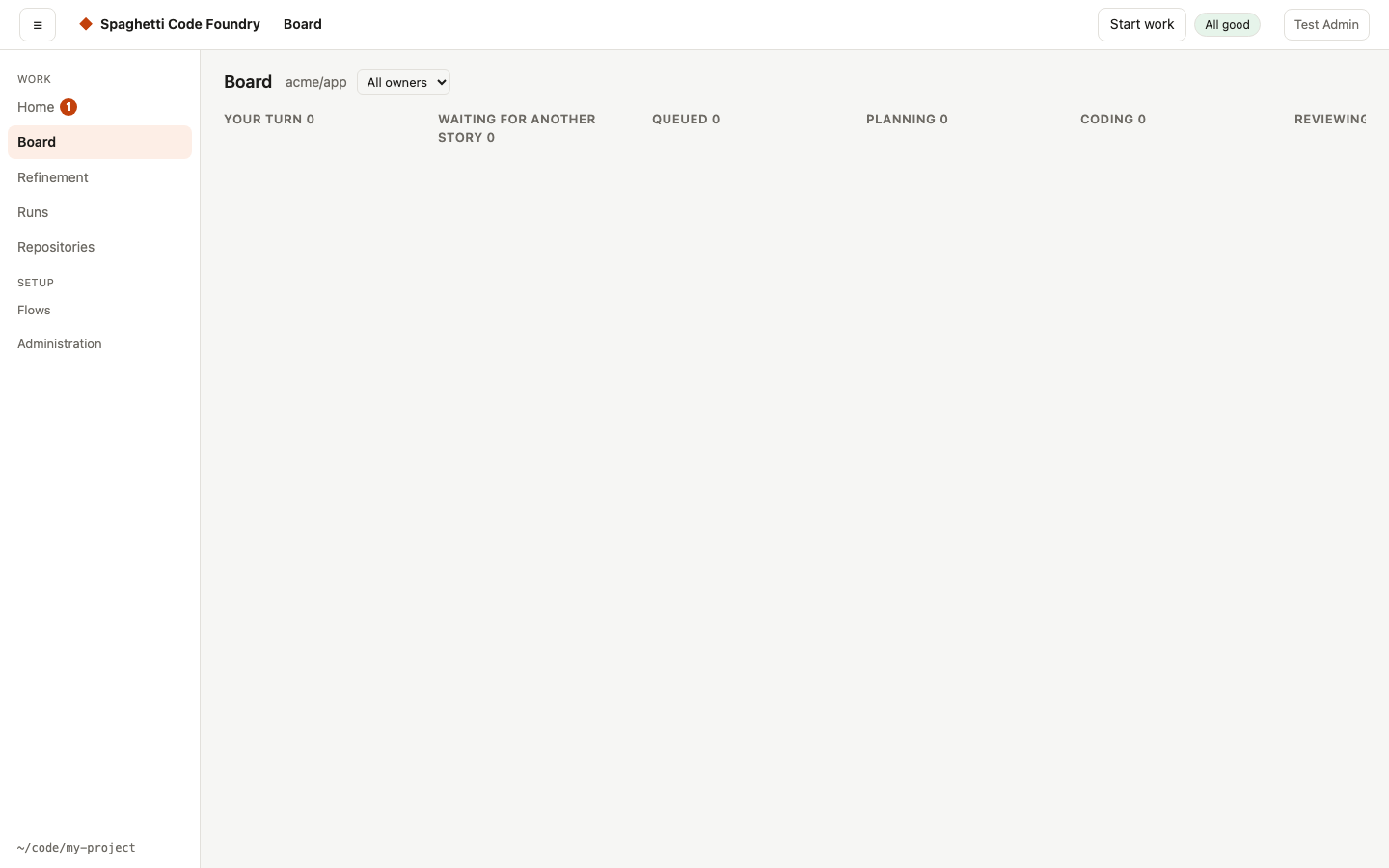
Board shows where every story is, like a parcel tracker. There is one board per repository; with more than one repository you get tabs.
- Columns: Your turn (something waits for you; here it also holds a run you stopped yourself, which the list on Home does not show), Waiting for another story, Queued (also paused by a limit), Planning, Coding, Reviewing, Merging (also finished work that waits for the scheduled release), Done (grouped Today and This week) and Failed.
- Which stories show: every issue a watcher tracks, at any age. Other runs on an issue show for 7 days after they end. Done shows the last 7 days. Evaluation runs and runs without an issue never show.
- The card: issue number and title, what happens next, the current step ("coding — step 12 of 29"), and the stories it waits for ("after #88"). A bug story has a "goes first" mark. Click the card to open its run page. A story that has no run yet is not a link; use the issue link on it.
- Owner (admins): a card that has a run shows the owner's name,
deleted userwhen the account is gone, and nothing for a card without a run or owner. All owners above the board hides the cards of other owners in the page; it makes no new call. Users see no owner name. - Highlight: "What is in the way of #89?" marks the whole chain of stories that hold it back and dims the others. The line above the board lists the chain, also stories that have no card. Show all clears it.
- Narrow screens (below 768 px): the board shows one column at a time. A picker named Column above it lists every column with its card count; the first column with cards shows by default. Your choice stays when the board refreshes, and if that column goes away the first column with cards shows. The owner filter and the highlight work as before; while a chain is highlighted, the picker marks the columns that hold cards of the chain. From 768 px up the board is unchanged.
- Updates: the page asks every 5 seconds, so what the Foundry knows shows within 5 seconds. Changes on GitHub show after the watcher's next check; when you come back from a GitHub link, the watcher checks at once.
- Which column running work is in: the Foundry reads it from the step names. Steps like
plan,ask_for_infoandrisk_gateare Planning;implementstarts Coding;review,review_1andreview_2start Reviewing;commit,push…andopen_prstart Merging. Any other step name stays in the phase of the step before. A flow with other names shows its running work under Coding.
Epics#
Epics (#/epics, for admins and users) shows how far each epic of one repository is and when it will be finished. It follows the repository context: with one repository it shows that one; with several, choose one in the Repository select. The address is #/epics?repo=<name>, and you can save a view.
- A row has the epic's name (a link to the epic's page; an issue epic also has an On GitHub link), a progress bar, how the epic grew, the expected finish and what holds it up. The last row, No epic, is for stories that belong to no epic and has no page.
- Progress. The bar shows Done, Working, Waiting, Your turn and Failed. The same numbers are written next to it ("3 of 10 done; Working 2, Waiting 4"), so you never need the colours.
- Growth. "Stories: 21 at the start, 95 now (16 were split)" tells you how the epic grew while it ran.
- Expected finish is a range, such as "Mon 12 – Tue 13 Oct", with "most likely …" and the reason in words. "Leaves out: …" names what the forecast does not count. Dates use your browser's time zone. When there is not enough history, the row says Too early to say and why, instead of a date.
- Held up by. Stories that wait for a person, failed stories and others are listed with their issue numbers and what to do. A finished epic shows when it finished and how long it took.
- Order. Open epics come first, by expected finish, then those that are too early to say, then finished ones (newest first). No epic is last.
- Fresh data. The page says how long ago the issues were read ("Issues read 12 min ago"). If not every issue was read, it says the counts can be too low. A repository without a watcher, or one the watcher has not read yet, shows "No data" and the reason. Refresh reads again; if that fails, the rows stay and a note says so, with Retry.
- Small screens. Below 768 px every row is a card.
The epic page#
Click an epic's name to open its page (#/epics/<id>?repo=<name>). The user display has the same page at /user/#/epics/<id>. The breadcrumb and Epics link back keep the repository. The page is for owners of the repository and for admins; anyone else sees "This epic is not there, or you cannot see it." It has these parts, top to bottom:
- Header. The epic's title (with its issue number), the progress bar and text, the growth, and an On GitHub link for an issue epic. Refresh reads again; the page also says how old the data is.
- Expected finish. The range and "most likely …" as on the Epics page, the reason in words, and Leaves out: … (see below). Under it, the sentence "It cannot know when a usage limit stops work or when a person will answer." (not shown for a finished epic).
- How it moved. One line per saved forecast, newest first, such as "3 days ago: Sun 11 Oct", with the range and the change from the day before ("2 days later", "1 day earlier"). Lines older than the seven newest are under Earlier. A line says "Today", "Yesterday" or "N days ago". With no saved forecast the page says so; the first one is saved the first time the Epics page or this page asks for the epic, and days before that are not filled in.
- Critical path. The longest chain of stories still to do, as a sentence with its length, the issue numbers in order ("#12 → #15 (done) → #18"), and "Now at #…": where that chain is now, with the story's state and its status. When nothing is left to build on any chain the page says so.
- Stories in build order. One numbered list in the order the epic builds them. Each story has its issue number and title (a link to GitHub), its state in the app's words ("Working", "Waiting", "Done" and so on), the status line, the help, and notes: "part of #…", "after #…", or "also waits for #… (outside this epic)".
- Dependency chains. A graph: the columns are the build levels, left to right, and each box is a story with its state and a link to its issue. A line runs from a story to the one it waits for. The critical path is marked. Below the graph, notes say when stories depend on each other in a cycle (then none of them can start first) and which stories outside the epic the epic waits for. The part is left out when the epic has no chain data.
- Stories over time. A chart with two lines, Stories (stories in the epic) and Done, one point per day, with the day labels. Show as table gives the same numbers as a table (Day, Stories, Done). The chart counts per UTC day, so its labels are UTC days, not your time zone.
- Pace. "About 2.5 stories a day over the last 14 days (all epics of this repository)", counted from the stories finished in the repository, not in this epic alone. Show per day lists the last 14 days, the newest first, with the window ("Last 24 hours", "1–2 days ago", …). "A story takes about 2 h 10 min from the start of its run to done" is the median of the finished story runs; it needs a few finished stories before it is shown.
Dates on the page use your browser's time zone, except the chart's day labels (UTC). The page works at 360 px wide: each part is one column, and only the chain graph scrolls sideways, in its own box.
Empty, loading and error states. While the page loads it shows "Loading the epic". An epic with no stories says "This epic has no stories yet.". When the repository has no data yet, the page says why, as the Epics page does. If the epic cannot be loaded, the page shows the error with Retry; if it fails again after it was shown once, the old content stays with a note.
How the forecast is made. The Foundry works it out again each time it is asked; no one types in an estimate.
- Pace. The repository's finished stories over the last 14 days give an average per day. This epic gets its share: the pace times the stories it has left, divided by all stories left in every epic and in No epic. A split story counts as its parts, so a story that was split into more parts adds to the days.
- Days. The stories left, with the split growth applied, divided by the epic's pace. This is the expected finish.
- Lower bound. The longest chain of stories still to do, times the median story time. The earliest finish is never before this; when the chain is the longest part, the reason names the chain.
- Range. The earliest and the latest finish are the expected finish divided and multiplied by a factor. The factor grows when the daily pace varies a lot and when little of the epic is done yet. Each end is at most three times away from the expected finish.
- Reason. One or two lines say what moves the date most: the pace ("N stories left at about X a day"), the longest chain, or the stories that split into more parts.
- Finished. When every story is done, the page says when it finished and how long it took.
- Too early to say. The forecast is not given when the epic has no stories, or when fewer than three stories were finished in the last 14 days. The page says which one.
- Saved each day. The forecast of each unfinished epic is saved once per day (UTC) and kept for two years. That is what How it moved shows.
What it leaves out. The forecast counts the work the Foundry does. It does not count:
- usage limits — time when a usage limit stops work ("stops for usage limits");
- a person's answer — time a story waits for someone to answer a question or approve a plan ("waiting for a person's answer").
It cannot know when a usage limit stops work or when a person will answer. It also cannot know stories that nobody has written yet, and it assumes the pace of the last 14 days goes on. When a forecast looks wrong, first check Held up by on the Epics page and the Waiting stories on this page.
Work page (redesign, off by default)#
The redesigned pages are still being built. An admin turns them on in Settings → Redesign with the box "Show the redesigned pages (still being built)". Reload the page after you change it. With the box off, Board is exactly as described above.
With it on, Board (#/board, and #/board/<repo> for one repository) shows the Work page: the stories as a board or a list.
- Filter: by repository, owner, status (any of the nine columns), who has the next move, and a text box that matches the title and
#issue. N of M stories shows when a filter hides some. If nothing matches you see "No story matches the filters." and Clear filters. - Group and order: in the Display menu. Group by status (default), repository, owner, next move or none. Order by issue number (default), age (oldest first) or title. Done stays newest first when grouped by status and ordered by issue number. Each group heading shows a count.
- Board and List: the switch Board | List changes the layout. Both show the same stories, filters, grouping, order and counts; switching asks the server for nothing and keeps your filters. Board is the default. The board has one column per group, with title and count. Grouped by status, all nine columns show, also when empty, and a status filter hides stories, not columns. Grouping "none" shows the board by status, and the Display menu says so.
- Cards: a card shows on at most four lines: the issue (link to GitHub) and title; who has the next move and what to do; "Blocked by #88, #87" (links) when the story waits for others; repository, owner and age in small text. "goes first" and the step line stay. Hold the pointer on a card to read the full sentence. A card whose next move is yours has a mark ("Your turn"), not only a colour; a blocked card has a Blocked pill. Click a card, or press Enter on it, to open its run; the links inside do not open the run.
- Display menu: choose what a card or row shows (repository, next move, blockers, owner, age, step), Compact cards, group by and order by. The choices apply to board and list. The menu stays open when the page updates.
- Rows: issue link to GitHub, title, repository (when more than one shows), status, who has the next move and what to do, the stories it waits for, owner and age. Click a row, or press Enter on it, to open its run.
- Keys on the board: each column has one Tab stop (the card you used last). Up and Down move in the column; Left and Right move to the same place in the next column that has cards; Home and End go to the first and last card of the column; Enter opens the run. Tab reaches the links inside a card. Focus stays on the same card when the board updates.
- Touch and narrow screens (below 768 px): columns scroll sideways and snap into place. Each column scrolls on its own, with its heading kept in view, and buttons and links in cards are at least 44 px tall. Nothing needs hover. On a large board, column bodies have a maximum height and scroll.
- What is in the way? A card or row with blockers has a button What is in the way?. It opens a side panel for that story; nothing on the board is dimmed or moved. The panel shows the title, issue link, status, the full sentence, who has the next move and where, owner, age and Open run when there is a run. Under "In the way of #N" every story that must finish first is listed in the order it must finish, the deepest blocker first; direct blockers are marked "directly". A story that is on the board is a button that opens it in the panel, and Back returns to the story before; one that is not on the board is a GitHub link. On a wide screen the panel sits next to the board and the board stays usable. Below 768 px it covers the page and Tab stays inside it. Escape or Close closes it and focus returns to the button. A card without a run opens the panel on Enter. The panel updates every 5 seconds; if the story is gone it closes with "#N is no longer on the board". Filters, layout and scroll position do not change. The open panel is not saved.
- Repository and owner come from the address:
#/board/<name>?owner=<id>. A saved repository or owner is ignored when the page opens, so the switcher, shared links and the page always agree. Changing the repository select writes#/board/<name>(or#/boardfor all) and keepsowner; changing the owner writes?owner=; Clear filters writes#/board. A later update keeps your selection and the address. - Unknown repository or owner: a repository in the address that is not in your list is kept. The page says "This repository is not in your list…" with Show all repositories, and does not widen the scope by itself. An owner without stories is kept too: you see "No story matches the filters." and Clear filters.
- Use as my context: when a context is offered, the toolbar shows Use as my context; a click sets it.
- Saved choices: your layout, filters (status, who, text), display choices, grouping and order are kept in this browser for your account. Another account on the same browser has its own. The repository and owner are not saved.
- Updates: like the board, every 5 seconds, and a check of the watcher when you come back from a GitHub link. If loading fails you see an error and Retry; data already shown stays.
Filters in the address#
You can filter Runs and the Board by repository and, as an admin, by owner. The filter is part of the address, so you can share it, and Back and Forward restore it:
#/runs?repo=owner%2Fname&owner=<account>(admin Runs).repoandownerare the only keys; anything else is ignored. A repository must look likeowner/name.The Board keeps
#/board/<repository>and only adds?owner=<account>. The classic Board matches the repository name without regard to case. For#/board/<name>with a name that is not in your list (for example an old link) it shows "This repository is not in your list…", all repository buttons and a button to#/board?repo=all; it no longer opens the first repository. Without a name in the address it still shows the first repository.On the user display, My runs accepts the address too and uses
repo.owneris ignored there: a user only ever sees their own runs.repo=all(for example#/runs?repo=allor#/runs?repo=all&owner=<account>) means "every repository". It opens the unfiltered list, so no repository chip is shown.
Above the list a filter bar shows one chip per active filter, each with a remove button, and Clear filters. With no filter there is no bar. If nothing matches, the page names the filter and offers Clear filters; this also happens for a repository your account cannot see.
With a repository context set, Clear filters and the remove button on the repository chip write
?repo=all (an owner filter stays), so the next page does not put your context back. For
example #/runs?owner=u1 becomes #/runs?repo=all&owner=u1. An address that names a repository,
#/board/<name>?owner=… and pages that do not follow the context are not changed.
Use as my context. When the page shows another repository from your list than your context, or all repositories while a context is set, the filter bar shows Use as my context and names the scope ("All repositories" or "Repository: owner/name"), even with no chips. One click makes it your context, updates the switcher and hides the button. It is not shown for the same repository, a repository that is not in your list, without a context, or on pages that do not follow the context.
The browser filters what the server already sent; no call gets a new parameter. The Runs list holds the newest 200 runs, so with a repository filter on a full list you see "Only the newest 200 runs are searched." Older runs of that repository are not shown. The 30-second refresh keeps the filter.
Refinement and repositories. The same ?repo=owner%2Fname filter and filter bar work on
#/refinement (open and dropped sessions), #/repos (My repositories) and, as an admin,
#/all-repos (the matching records of all owners). Remove and Clear filters work as on Runs.
On Refinement, New refinement session preselects the filtered repository when it is in your
list. A session page #/refinement/<id> is not filtered and ignores the query. If the
repository is not in the answer, the page says "This repository is not in your list. It may have
been removed, or you may not have access." with Clear filters; the text is the same whether
the repository exists for another account or not. Refreshes keep the filter. The server gets no
new parameter.
Repository context#
The switcher sits at the start of the top bar, on both displays. It shows your current repository so that you do not filter each page yourself.
- No repository: the switcher shows a short text. One repository: a plain label. Two or more: a button that opens a panel. When you add or remove a repository, the switcher loads again and changes by itself.
- The panel lists All repositories first, then Favourites (use the star), Recent and the rest. As an admin the rest is grouped by owner. From eight repositories the panel has a search box. Escape or a choice closes it.
- Pages that follow it: Runs, Refinement, Board, My repositories and, as an admin, All
repositories. With two or more repositories they open on your current repository
(
?repo=<name>,#/board/<name>, or?repo=allfor All repositories). If you choose another repository on one of these pages, the address changes and the page draws again; anownerfilter stays. On other pages only the label changes. - The address wins. An address that already names a repository, or has any filter, is not changed (see "Filters in the address"). With fewer than two repositories no address is changed.
- Where the choice is kept: per account, in this browser. In the read-only preview (
?as=) it is not read or written. - Problems. If the stored repository is no longer in your list, a notice says so and the switcher shows All repositories. If the list cannot be loaded, the switcher shows "Repositories could not be loaded." with Retry; the pages still open.
Saved views#
You can save the filters of a list or board under a name and come back with one click. This works on Runs, Board (also the redesigned Work page), Refinement and My runs.
- Save view is in the filter bar. Type a name of 1–40 characters (spaces at the ends are
removed). A name can be used once per page. You can keep up to 20 views per account. A view with
no filters is allowed; its link uses
repo=all. - The row. Your views of the current page are shown as links above the list. A view is only an address (the page and its filters). Opening it just goes there and writes nothing; the data is what the server returns for you now. The active view is marked.
- Manage views opens a dialog where you can rename, move up or down, and delete views. Delete asks you to confirm and says that only the saved view is removed, not runs, sessions or repositories.
- Where they are kept: in this browser (
localStorage), per account. They are never sent to the server, and another account in the same browser does not see them. If the stored data is garbage, it is ignored and replaced when you next save. If the browser storage does not work, the page works without views. - Out of date. If a view's repository is no longer in your list, or its owner is no longer among the run owners, the view is marked "out of date" in the row and in the dialog. Opening it shows "nothing matches" with Clear filters and Delete this view. Nothing is deleted automatically. On the Board and Work page the owner check needs the owner list, which only admins can load; for others the owner is never marked out of date.
- Preview. In a "view as user" preview no views are shown and none can be saved.
The runs list#
A run of the architect has the mark refinement; click it to open its session.
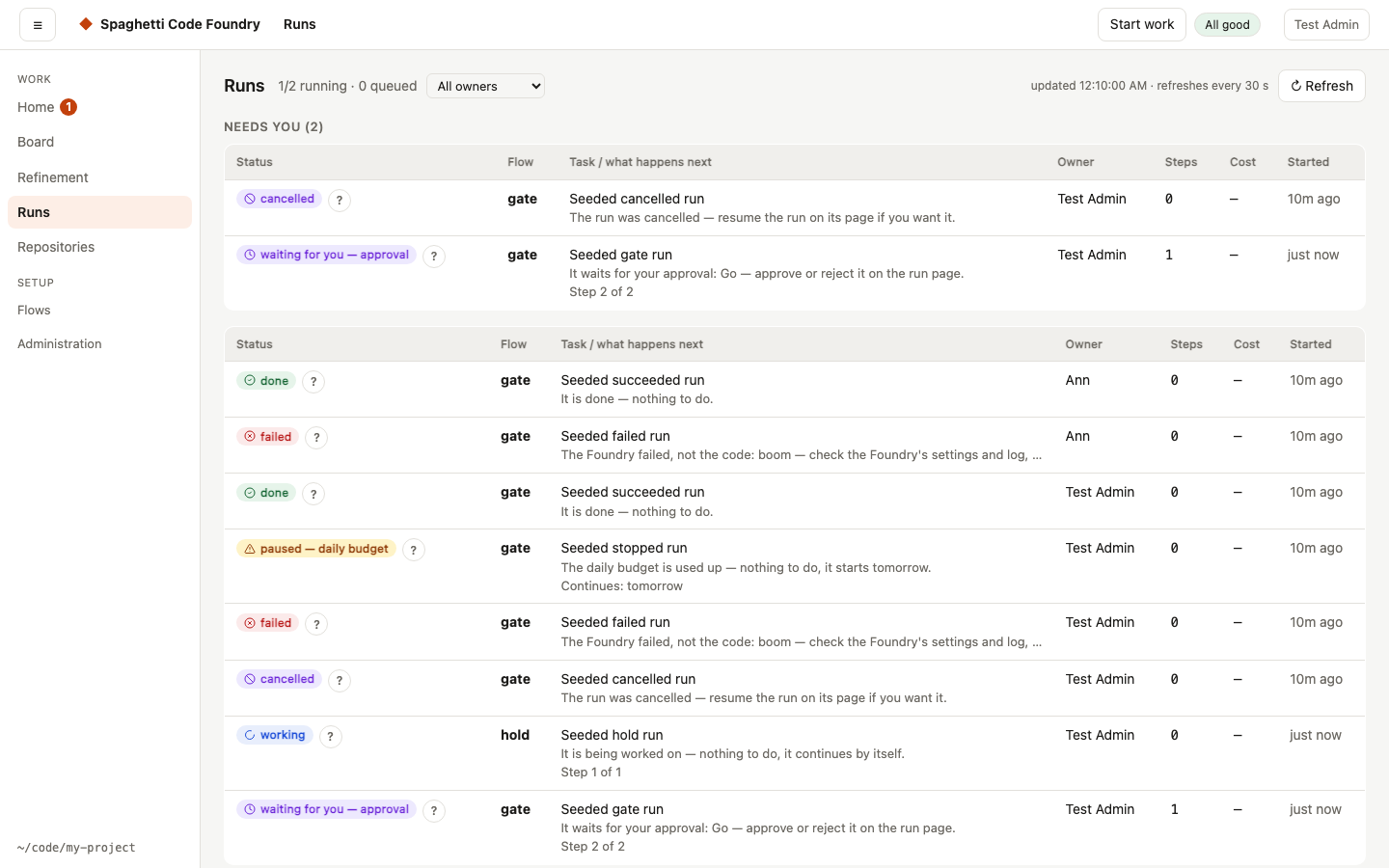
Runs are grouped in sections, in this order, each with a count: Needs you, Running,
Queued, Failed and Completed. An empty section is left out, and a run is in exactly one
section. The section comes from the Foundry's record: Needs you holds runs whose next move is
yours (the record says You), Queued the runs in the queue, Running the running runs
(and waiting runs that are not yours), Failed the failed runs, Completed the rest. Runs
that wait for a limit, the budget or another run are not under Needs you. The first three
sections are open; Completed is quieter and collapsed when it has more than 10 runs (press
Show all). Every row shows the status, the next action ("what happens next", also for finished
runs), the first line of the task, the repository and issue, and when it was updated. At most N
runs execute at the same time (Settings → Runs at the same time); the rest queue. Each queued row
shows its place (1 of 4), a link to what it waits for and, for a bug story, a "goes first" mark.
An admin sees the running count (2/3 running) in the Queued heading.
Search and filters (admin). A bar above the list helps you find a run:
- Search runs takes a run id, an issue number like
#7, or text (200 characters at most). The list updates 300 ms after you stop typing. Your text and cursor stay in the box while the list refreshes. - Repository, Flow, Status, Time (Today, 7 days, 30 days) and Owner are selects. The server answers them, so a run older than the newest 200 is found too. A repository name works in any letter case.
- Only what needs me and the Show buttons (All, Needs you, Running, Queued, Failed,
Completed, Archived) only narrow what is already loaded. Archived asks the server for the
archived runs (
archived=1); "Only what needs me" and the repository filter apply there too. - Clear filters shows when a filter is on and puts the list back to
#/runs.
Queued jobs that have no run yet follow the repository, flow, time, search and owner filters; a status filter hides them. A line for screen readers says "1 run matches." or "N runs match." With no match you see "No runs match your search and filters." and Clear filters. When a filter asks the server and 200 runs come back, the list says "Only the newest 200 matches are shown." If a change cannot be loaded, the bar and the address go back to the last filter that was shown and a message tells you why.
The address keeps your choice, so you can share the link:
#/runs?q=…&repo=…&flow=…&status=…&time=…&owner=…&needs=1&view=…. Unknown values are ignored.
The Archived view is view=archived. A saved view still remembers the repository and the owner only.
The list refreshes every 30 seconds without jumping: your keyboard focus, scroll position, open sections and the chosen owner stay as they are, and only the rows that changed are redrawn.
Density. The bar has a Density group: Comfortable (cards, the default) and Compact
(one table per section, one row per run). The compact table has the columns Status, Run, Next,
Task, Repository and Updated; an admin also sees Owner, Steps and Cost. Each row has the same
status mark, links, buttons and checkbox as the card. Switching keeps open sections, Show all,
the selection and the focus. The choice is remembered in this browser (scf-runs-density in local
storage); a browser that does not allow storage simply forgets it. The switch is on My runs too.
Archive several runs. Under Show, Archived lists the archived runs in one section, "Archived (n)", newest first. Rows in Failed, Completed and Archived have a checkbox labelled "Select run <flow> <work or id>"; each of these sections also has Select all, which ticks the rows shown in it (after Show all). Other sections, and the read-only preview ("view as"), have no checkboxes.
With a selection, a bar shows "N selected", the action and Clear selection. The action is Archive N runs (or Archive 1 run), or Take out of the archive in the Archived view. Archiving asks once: "Archive N runs? They stay available under Archived." Taking out does not ask. The runs are sent one after the other; while a batch runs the buttons do nothing. A run that is queued, running or waiting is refused, and the reason is shown. The result is a message such as "Archived 10 runs." or "Took 10 runs out of the archive."; when some were refused it adds "2 were refused: …" with the reasons. The list then reloads.
The selection stays through the 30-second refresh. A run that leaves Failed, Completed or Archived is dropped from it, and changing to or from the Archived view clears it.
An admin sees every run, with the owner, the steps and the cost in each row, and can pick one
account in the Owner filter next to the title (the list shows "All owners" and each account
with its number of runs). The owner shows the account's name, deleted user when the account is
gone, and nothing for a run without an owner. Queued rows show the owner's name the same way.
A user sees only their own runs and their own queued runs; runs of others in front of them show
as "n runs ahead of you". The same sections show on My runs, with the same selection and bar
for archiving (a user can archive their own runs only).
The Status column shows the plain status name (see "Words the Foundry uses"). Press the ? next to it to read what it means and what happens next, and press it again to close it. It works with a mouse, the keyboard (Tab, then Enter or Space) and touch. Pressing it does not open the run.
Every status pill also shows a small icon before its words (for example a check for done, a clock for waiting, a cross for failed), so you can tell what it means without the colour. The words are unchanged.
How long will it take? A run that is not finished shows "Step N of M": the number of its step in the flow. It can jump, because steps that only run when another step jumps to them are counted too. A running run also shows an estimate ("Estimate: about 20 min left (usually 25–40 min in total)"). It comes from succeeded runs of the same flow (same steps) in the same repository, among the newest 500 runs, and counts working time only. It appears after 3 such runs and starts again when steps are added, removed or renamed. It is an estimate, not a promise. "Taking longer than usual" means a step runs much longer than it usually does. Nothing is wrong yet: look at the live log.
Search (API)#
GET /api/search finds runs, issues, refinement sessions, repositories and flows by text or by id.
The Search box in the top bar (see "Search" under Keyboard) uses it.
?q=text— words separated by spaces. Every word must match. Equal matches rank above prefixes, prefixes above word starts, word starts above "contains". A word like#254matches issue and run numbers only;254matches numbers and text.qcan have 100 characters at most, else the answer is 400. An emptyqgives{ "q": "", "groups": [] }.?id=type:id— up to 8 times, to check that things still exist and may be seen.typeisrun,issue,refinement,repoorflow. A wrong shape gives 400.qis ignored.- The answer is
{ q, groups, incomplete? }. A group hastype,label,hits(8 at most) andmore(true when there are more). A hit hastype,id,title,hrefand, when known,status,repo,detail,ownerandat.statusis the same word that Runs and the queue show. If one source fails, the other groups still come back andincompletenames the failed type. - A user gets their own runs (also queued ones), repositories and refinement sessions, and the flows they can start. No issues, no owner names, no server paths, no costs.
- An admin gets the runs, repositories and sessions of all accounts with owner names, the
issues on the board, and all flows. With
as=<user>while viewing as that user, the answer is the one the user would get.
A run#
Open a run to follow it live. At the top, the What happens next block says who has the next
move, what to do, why, a link to the place to do it, and when it continues by itself (if
known). It updates live. While the run is not finished it also shows its progress, the estimate
and the "Taking longer than usual" hint (see "How long will it take?" above). The raw reason of a
waiting run (the approval message) is the Details row below. An admin also sees an Owner
row: the name of the account that started the run, or deleted user (no row for a run without an
owner).
A failed run shows a failure card instead: who has the next move, the kind of problem, what happened, why, what the Foundry already tried, what to do first and your four options (Retry, Retry with a hint, Change the plan, Close). The page opens on Steps, and Show the failed step opens the step that explains the failure. The raw reason is one click away under Raw details in the card; it is never the first thing shown. A user sees the card without raw details.
The status next to the flow name has the same ?. The Current step (while the run works) or Resumes at step (when it is stopped) row names the step and says what it does: its description, or the kind of step when the flow gives none.
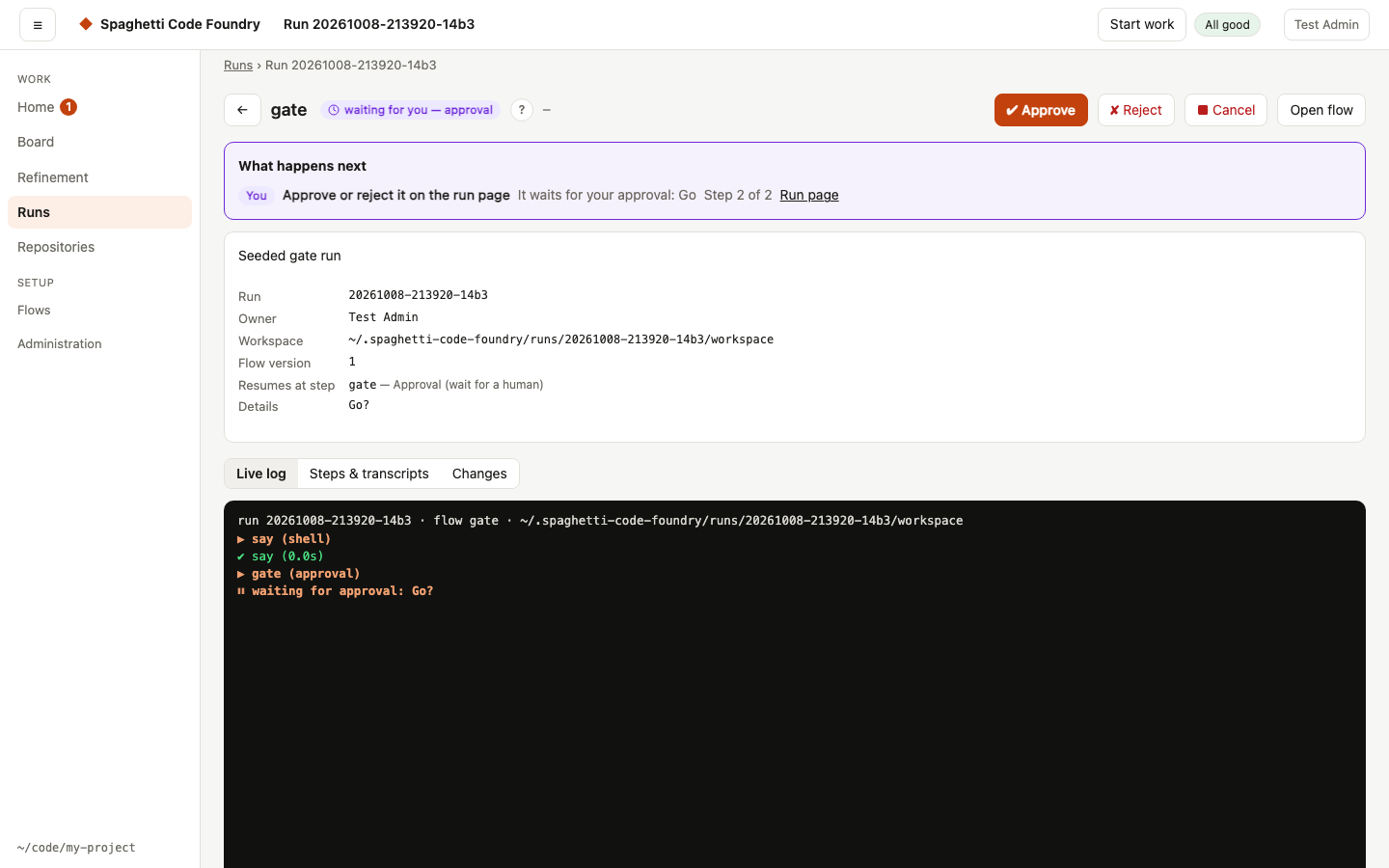
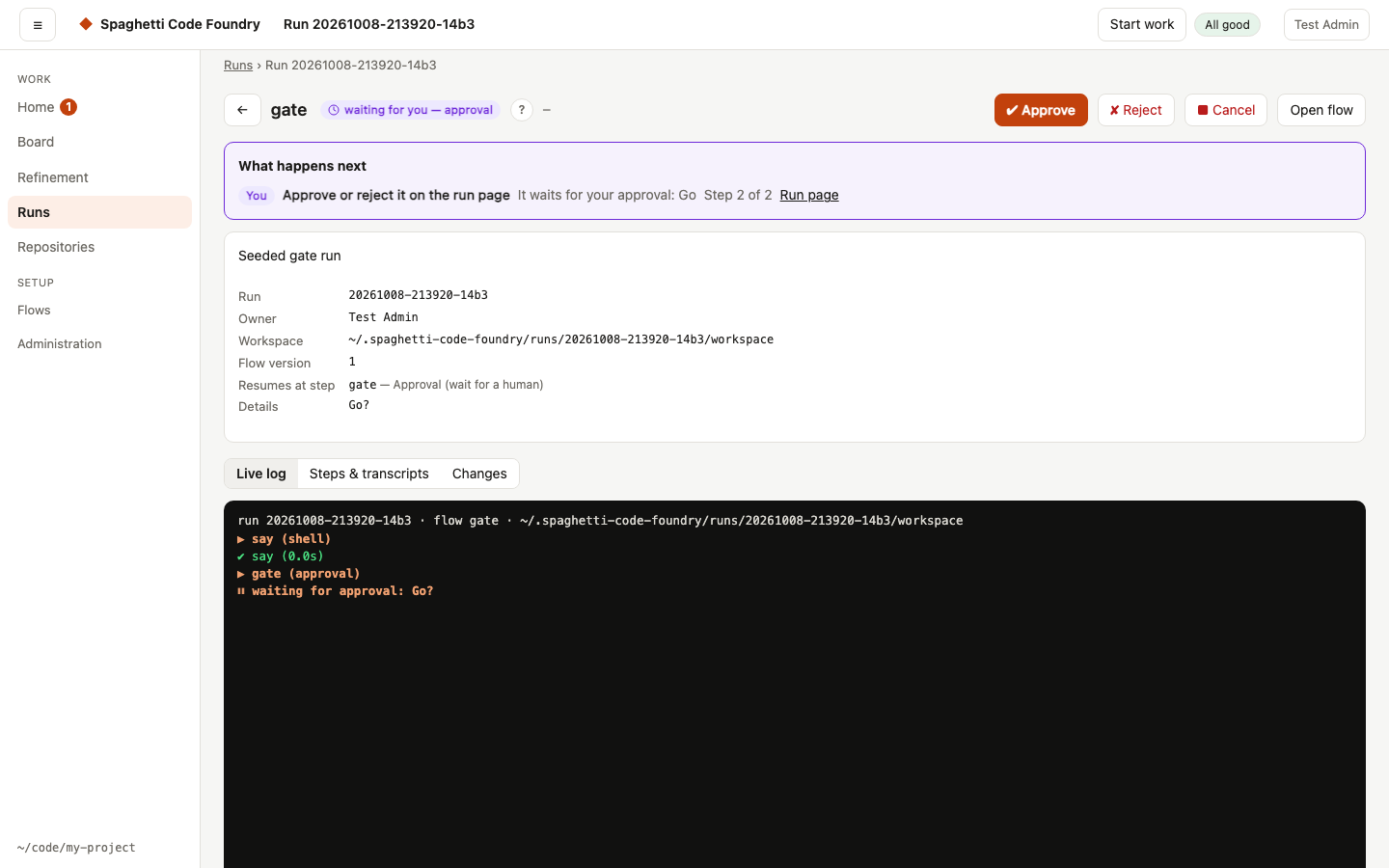
Live log — each step as it starts and ends, with the agent's tool calls, duration, cost or tokens. A user sees the steps and the tool names only.
Steps & transcripts — a timeline of every step with its outcome. Open an agent step to read the whole conversation: what it said, each command it ran and the output, and the final result. The label next to the step name shows which agent and model ran it (here Claude on Haiku wrote the code, and Codex reviewed it).
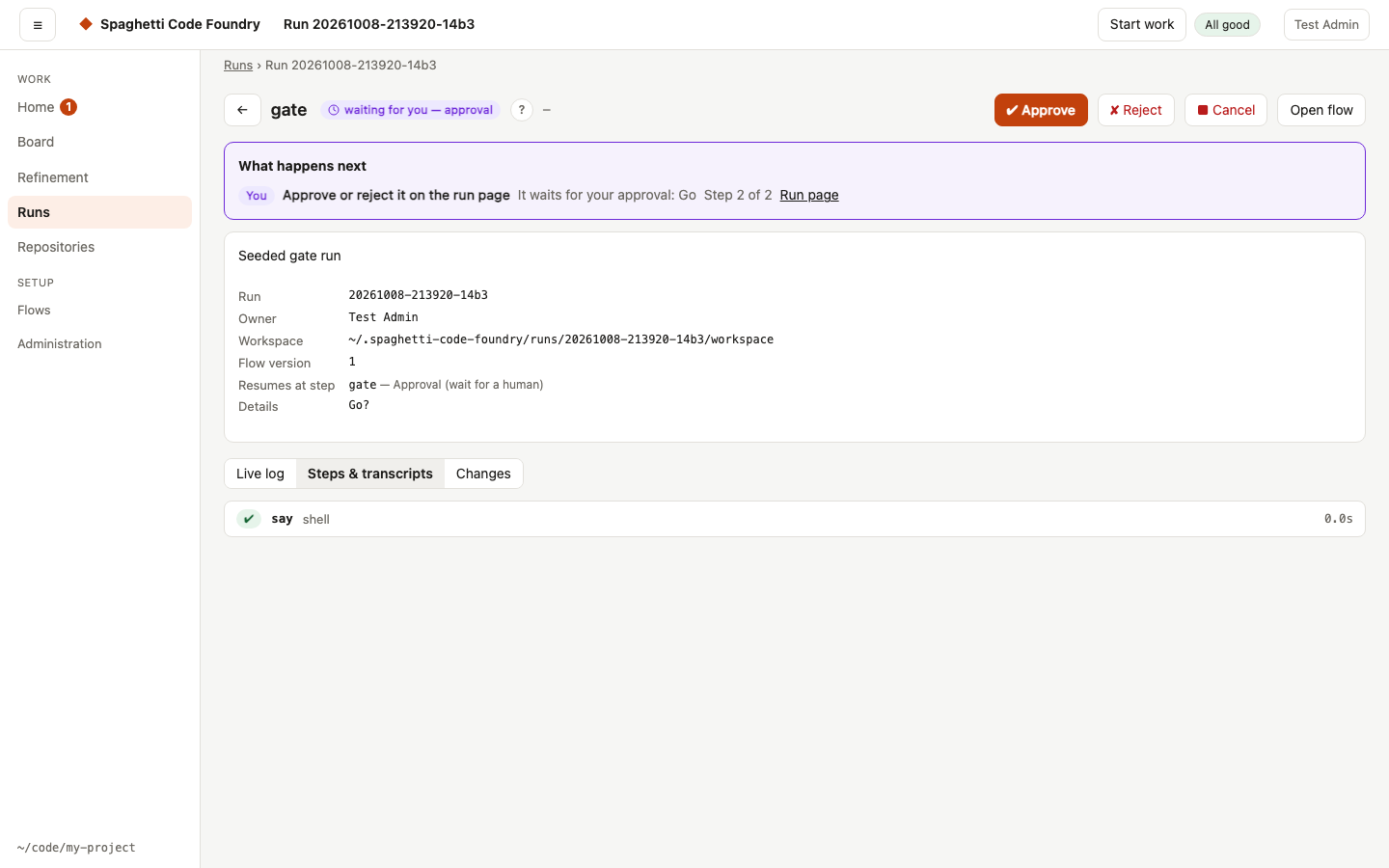
A user sees Steps only: each step with its result and a plain sentence for a failure, but no output, no transcripts and no cost.
Evidence — the Evidence record of the run: whether its record verifies (Verified, Not verified, Not finished or No record), the result, the flow and its version, the commits, the approvals, the tests, the pull request and the files. A failed check names the event or file, says what is wrong and what to do next. Check again reloads the record, and Export evidence downloads
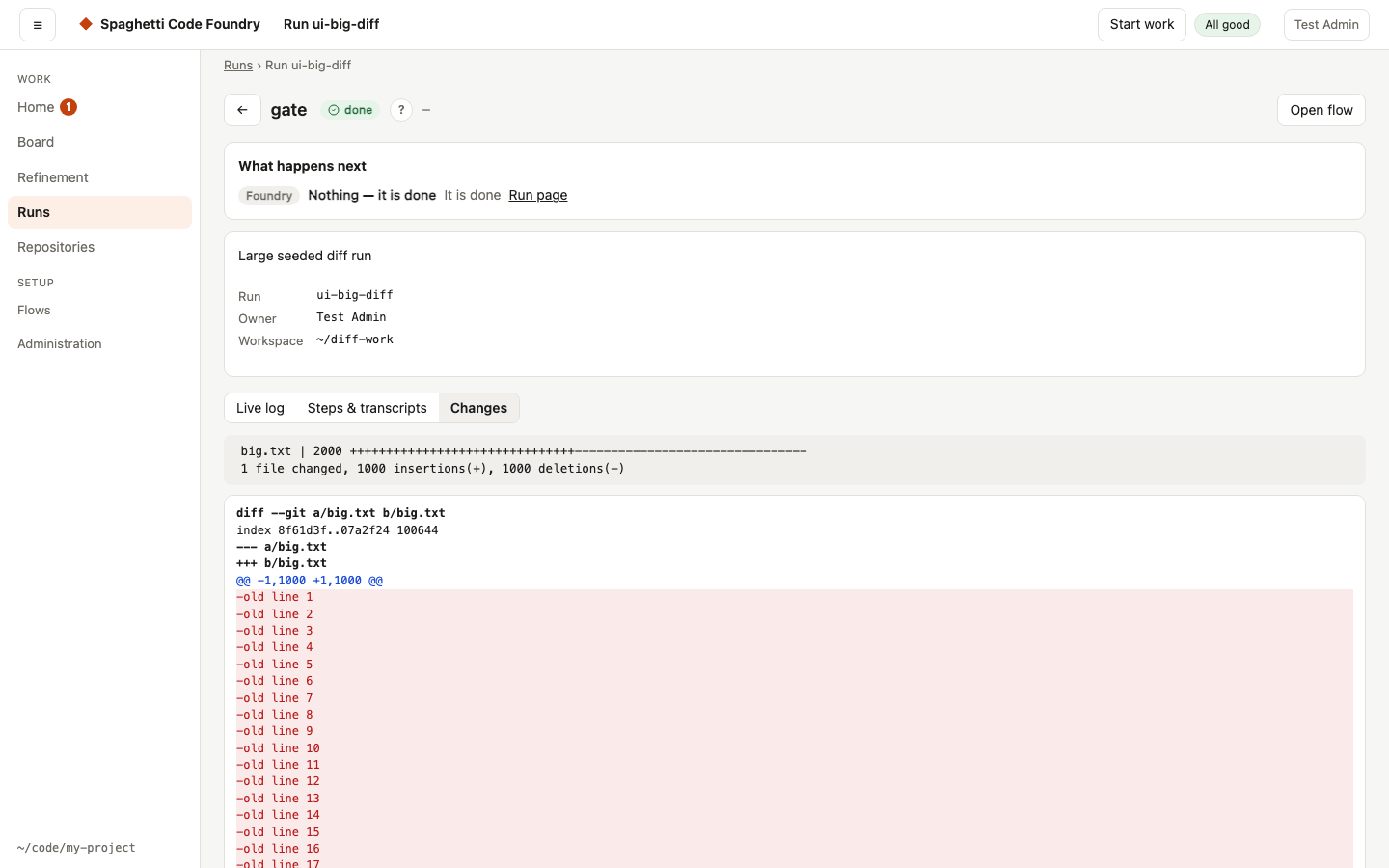
evidence-<run-id>.json(the same answer as the API, see "Evidence of a run"). A user sees file counts and no paths; models, policy denials and paths are for administrators. The export never holds the content of a transcript or a log.Changes — the complete diff the run made, including uncommitted work.
A very long log, diff or transcript does not slow the page. The live log keeps the last 2,000 lines and says "N earlier lines are not shown" above them; it follows the end only while you are at the end. Changes lists each file closed (a diff of one file is open) and builds the lines when you open it; a file over 1,500 lines shows the first 1,500 and a Show all button. A transcript shows the first 200 events with Show 200 more, and a tool result over 20,000 characters is cut with Show all.
Approvals#
An approval step pauses the run until a person decides. Approve or reject in the UI, with
scf approve <run-id> / scf reject <run-id>, or — for GitHub flows — by commenting
/approve or /reject on the issue (only people with write access count). A waiting run shows
a What happens next block with You as who and the approval message as the reason.
When something goes wrong#
Retry from the failing step continues a stopped, failed, cancelled or interrupted run from the step where it stopped (the step is in the button's tooltip), with everything it already did kept. Fix the cause first (e.g. answer the question, fix the environment), then press it. It is the filled main button of the run header, like Approve for a run that waits. A Codex step with
resume:continues the earlier session only when it runs with the same Codex folder; otherwise it starts a new session and the log says why.Codex and your personal setup. Every Codex step of a run that the server or a watcher starts gets a clean Codex folder of its own, whatever
isolate_agentssays. A local CLI run followsisolate_agents. The mode depends on how the step signs in; the log says which one in a line that starts with "Codex:".Mode When Personal config.toml, MCP servers, plugins, hooks, skills,AGENTS.md, command rulesSign-in Clean folder, key or local model A local model, or a CODEX_API_KEYthe step seesNot used The key, or none Clean folder, login copy A Codex login file, no key, not local Not used Only the login file, a copy for this session; it is removed when the session ends Not isolated isolate_agents: falsein a CLI runUsed The login stays The clean folder is
<run folder>/home/.codex, made 0700, and the step'sHOMEis<run folder>/home, so skills in~/.agents/skillsare not seen either. Session history stays, so a resumed session still works. No Codex session starts with an MCP server, so a server in your personal config is never reached. A step never gets your personal Codex folder when it is isolated. Pushing is blocked: a Foundry command rule forbidsgit push, and Codex's own sandbox has no network. A step withbypassPermissionsand no sandbox is refused, because it could push. A login kept in the keychain, a linked login file or a missing login refuses the step, with a message that says how to sign in with a file. A refreshed token is written back to your personal file only when that file has not changed meanwhile.OPENAI_API_KEYalone does not select the key mode. If the clean folder cannot be made, the step is refused; it never falls back to your personal folder. In a CLI run withisolate_agents: false, nothing changes: no note, no "Codex:" line. A step held by the OS sandbox gets no clean folder of its own; its log says that git push is blocked in that session.Retry from step… re-runs from any earlier step.
Cancel stops a running run, or a run that waits for approval or is stopped; you can resume it later. Removing a queued approval from the queue cancels that run too (Resume brings the approval back). A stopped run (for example one that waits for your answers) cancelled this way is saved as "cancelled — nothing to do": nothing continues it and it leaves every list of things that wait.
scf runs cancel <id>andPOST /api/runs/:id/canceldo the same. A refinement session is not cancelled this way.Archive takes a finished run (succeeded, failed, cancelled or stopped) out of the list of runs, so the list shows current work. Nothing is deleted:
GET /api/runs?archived=1lists the archived runs, and the run, its log and its changes open as before. Unarchive puts it back. On the runs list you can archive or take out several at once (see The runs list). A run that is queued, running or waiting cannot be archived (409). You can archive your own runs; an admin can archive any run. The mark is shared: it hides the run from everyone's default list. Resuming, retrying, approving or answering an archived run removes the mark. Board, Your turn, statistics and the monitor still count it.
Runs survive restarts: if the Foundry stops mid-run, the run is marked interrupted and can be resumed (watchers do this automatically).
Answer a run's questions. When a run stopped with questions (it stopped at send_back or
ask_for_info and that step printed something), its owner or an admin can answer with
POST /api/runs/:id/answer and the body { "text": "…" }. The call answers 202 with { "runId" }.
The answer is saved with the run (answers in run.json: at, text, by = account id) when the
call is accepted, and a resume is queued at the step the run would resume at. From then on every
step reads the task followed by all answers so far, oldest first, under the heading
## Answers to the questions of this run (oldest first); this holds for {{task}}, $FACTORY_TASK
and $SCF_TASK. The task of the run itself stays as it was typed. The answer stays when the
queued resume is cancelled or dropped, when the account is blocked, and over a restart; a later
resume continues with it. The text is saved as sent, except that stored secrets become [redacted].
It is never in queue.json, the audit log or a server log line.
- Limits. At most 4000 characters per answer, and at most 100000 bytes for the task with all answers. A call over a limit is refused; nothing is cut.
- Refused, and nothing is written (no change in
run.json, no job, no audit line): 404 for an unknown run, and for a user a run of another account (same body); 400 whentextis missing, not a string, empty, only spaces, or has a NUL character; 400 over 4000 characters or over 100000 bytes; 400run <id> is already queued or running; 409 when the run did not stop with questions, when a watcher follows it (answer on the issue; a run started by hand is answered here), when its saved flow has no step that reads the task (an older run), and for an architect run of a refinement session; 500 when the stored secrets cannot be read. - When a file cannot be written. If the queue file cannot be written, the call fails and the
answer is taken out of
run.jsonagain. If that fails too, the answer stays saved without a job; resume the run and it continues with the answer. Once the job is in the queue file the call is accepted. - Not together with
scf resume. The server does not see a run thatscf resumecontinues in a terminal. Do not do both for the same run at the same moment: the answer can be lost and the run can run twice. - In the run view (
GET /api/runs/:id, the list and theupdateevents) a user seesanswersas{ at, text }(noby, folders hidden) andcanAnswer: trueexactly when the call would be accepted now.canAnsweris absent while a resume is queued. An admin sees the rawanswers. - The audit log gets
run-answerfor an accepted answer only. - On the run page of the user display. Under the questions of a run with
canAnswer, the page shows Your answer, a text box and Send answer. Ctrl/⌘+Enter sends too. An empty box shows "Write your answer first." and sends nothing. The text is sent trimmed; the button is off while the call is out. On success the box is emptied, the form goes away, a toast says "Answer sent — continuing" and the page shows the run as queued or running. A refusal shows the server's sentence in the form; your text stays. The form is not shown withoutcanAnsweror while the run has a queued job. Updates of the page keep your text and the focus. When the run stops with questions again, the form comes back by itself. The answers given are listed under Answers given, oldest first, as plain text — also after a cancelled resume, when Retry continues with them. - What happens next. For a user's run that can be answered on the run page, the sentence reads "The planner has questions — answer the questions on the run page and it continues." and links to the run page. A run a watcher follows, a run that cannot read an answer, and every record an admin reads still say "… on the issue" (the admin pages have no box). The comment on GitHub does not change.
The failure summary. A failed run (the run page and the comment on the issue) says what failed, why, what was tried and the kind of problem:
- A problem in the code — the tests keep failing, a review is rejected by the checks. Example: "The step run_tests kept failing. Already tried: 3 fix attempts."
- A problem with the environment or the Foundry — a blocked command, a login, the network, wrong model settings. Example: "git could not log in to the remote."
- A limit — the budget of a step or of the run was used up. Example: "It used the amount the flow allows for one run."
- A person's decision — someone rejected an approval. The note of the approver is shown.
The four options, for a watched issue and for a run by hand:
| Option | Watched issue | Run by hand |
|---|---|---|
| Retry | Remove the failed label, or resume the run on its page | Resume the run on its page (a new run when the fix is a change to the flow, such as a larger budget) |
| Retry with a hint | Write the hint as a comment on the issue, then remove the failed label | Start a new run and put the hint in its task |
| Change the plan | Change the text of the issue, then remove the failed label | Change the task, then start a new run |
| Close | Close the issue if the work is no longer wanted | Leave the run as it is |
For a code failure the why is one sentence written by a small model that read the end of the failing output (see "The failure summary call" in Costs). The comment and the card then say so. If the model says the cause is the environment, the failure counts as a Foundry failure.
A usage limit, the daily budget, a sign-out and an unreachable AI service do not fail a run: they pause it, and it continues by itself (a sign-out needs you to sign in again first).
When the Foundry itself failed. Some failures are not a bug in the code. The run page, the Runs list, the watcher card, the Dashboard and the notification then say "The Foundry failed, not the code", what went wrong and the fix. The causes and fixes:
- A command the agent was not allowed to run: allow it in the flow (the step's allowed tools or
permission mode), then resume. The sentence shows only the tool and program, e.g.
Bash: curl; the run page's log has the whole command. - A push to a protected branch was blocked: change Protected branches in Settings or the flow's branch, then resume.
- A hotfix: GitHub refuses the push to
main("only accepts pull requests"): allow direct pushes for the Foundry's account on GitHub, or remove thebuglabel so the issue is built as a feature. Nothing was pushed. - A hotfix:
mainchanged in the same places while the run worked ("changed in the same places"): nothing was pushed and the branch is kept. Delete thehotfix/…branch and start the issue again. - A hotfix: the tests fail on
mainwith the fix merged in (red_main): nothing was pushed tomain. Fix the cause on the hotfix branch and resume, or remove the label and build it as a feature. - A hotfix:
developcould not take the fix: the fix is onmainand the issue is closed; see "Hotfix" under Branches for what to do. - A marker the Foundry could not read (no
PLAN_STATUSline, no questions to ask, noSUBTASKlines): resume the run to try the step again. - A skill request in the plan that is not valid ("planning failed: the skill request of the plan is not valid"): resuming does not help, because the stored plan is the same. Start the run again so the issue is planned again. The step output says what was wrong. For every skill stop reason see Find out why a run stopped.
- An internal error, an unknown step, or a run that failed before any step ran (workspace, bot identity, GitHub App token): fix the setting, or restart or update the Foundry, then resume.
- A git or gh login error, or a network error, in a command of the flow: log in again (
gh auth
login
) or check the network, then resume. - Wrong model or provider settings, or a missing
claudeorcodexprogram: fix the setting or install the program, then resume. - An interrupted run: resume it (a watcher does this by itself).
A failed test, guard or review, too many visits of a step and a push blocked by the secret scan are code failures and keep the usual text. A step budget that is used up is a limit, and a rejection is a person's decision. If a command was blocked earlier in such a run, the sentence adds a hint to allow it in the flow if it was needed.
Small screens#
On a small screen some pages show their content but not the controls that change things. A note above the page says why: "Editing needs a wider screen (768 px or more)." Use a wider screen to make changes.
| Page | Below 768 px | 768–1023 px |
|---|---|---|
| Users, one user, Settings | read-only | full |
| Credentials, Audit, Dashboard | read-only (the note only; they have nothing to change) | full |
| Overview, Watchers, one watcher | read-only | full |
| All repositories, Models, Problems, Maintenance | full for now | full |
| Flows and the flow editor | view and run (below 1024 px) | full from 1024 px |
| Every other page, the Library included | full | full |
On a read-only page:
- Users: the table stays; there is no "+ Add user", no "Default limits" and no action in the empty state.
- One user: only "View as user" is offered; the Account card stays.
- Settings: no Save button. You can select and scroll through text fields but not change them; lists and checkboxes are disabled.
- Watchers: the ↻ button stays; there is no "+ Add watcher", "+ Add the monitor" or empty-state action.
- One watcher: the settings text stays; there is no Check now, Edit, Enable/Disable or Delete.
- The monitor's page: the findings table stays; there is no "Switch bug stories…" button, no "Mute a detector" row, no Actions column and no "End mute".
- Overview: a problem that was closed elsewhere shows no "Cancel run" button. The health panel in the header and the Problems page are unchanged.
- Flows (below 1024 px): the note says "Editing a flow needs a wider screen (1024 px or more)." You can open a flow, read it in Visual or YAML mode and start a Test run. There is no Save, no More menu, no add-step bar and no "Draft flow" or "Blank flow"; fields can be selected and scrolled but not changed, and Ctrl/Cmd+S does nothing.
#/newsays it needs a wider screen, unless you have an unsaved draft; then the draft shows read-only. If the window gets narrower, an unsaved flow keeps its edits (the note says "unsaved changes are kept") and you can save it after widening the window again. The same holds in the other direction.
Resizing the window across 768 px redraws the page only when its level changes. If a dialog is open, it stays and the page is redrawn when you close it. Unsaved Settings fields are lost when the width crosses 768 px. The lock is in the page only; the server still accepts changes made from a wider screen or through the API.
Accessibility#
The Foundry aims to meet WCAG 2.2 AA. Open Account → Accessibility to read the statement: what is checked, the known limits and how to report a problem. The statement is also in ACCESSIBILITY.md, and ACCESSIBILITY_SCRIPTS.md has keyboard and screen-reader scripts for the owner. Nothing was run in a browser or with a screen reader yet.
Words the Foundry uses#
One glossary decides the words. The app, the comments on GitHub and the labels all use them. Every status in the app has a ? that shows the two sentences from this table.
| Status | What it means and what happens next |
|---|---|
| waiting for you — questions | The Foundry has questions about this issue before it starts. Answer them on the issue, or reply /defaults to go with the recommendations. When the planner asks: The planner has questions that the issue and the code do not answer. Answer them and the work goes on. |
| waiting for you — risky plan | The plan is risky, or you asked to check it, so coding waits for your decision. Approve it to start coding, or reject it and say what to change. |
| waiting for you — split | The issue is too big for one change, so the Foundry proposes smaller issues. Approve and it creates them and closes this one, or reject it and say what to change. |
| waiting for you — approval | A step of the run asks for your approval before it goes on. Approve or reject it, and the run goes on with your decision. |
| waiting for you — stopped | The run stopped at a step that needs a person. Look at the run, fix what it asks for and resume it. |
| waiting for you — release pull request | A release pull request brings finished work to main, and this one is not merged yet. Merge it and the Foundry goes on. |
| in develop (ships with the 17:00 release) | The work is finished and waits for the 17:00 release. Nothing to do now — the release pull request then brings it to main. |
| waiting for #88 | It needs #88 to be done first. Nothing to do — it starts by itself after that. |
| waiting for another run | Only one run at a time works here, and another run is active. Nothing to do — it starts when that run is finished. |
| waiting — your limit for today is reached | You started as many new runs today as the administrator allows. Nothing to do — it starts by itself tomorrow. |
| waiting — your limit of runs at the same time is reached | As many of your runs are working at the same time as the administrator allows. Nothing to do — it starts by itself when one of your runs ends. |
| waiting — the owner's limit of runs per day | The owner started as many new runs today as their limit allows. Nothing to do — it starts tomorrow, or sooner when you raise the limit on the Users page. |
| waiting — the owner's daily budget | The owner's daily budget is used up. Nothing to do — it goes on tomorrow, or sooner when you raise the budget on the Users page. |
| waiting — the owner's limit of runs at the same time | As many runs of the owner are working at the same time as their limit allows. Nothing to do — it starts when one of them ends, or sooner when you raise the limit on the Users page. |
| waiting for another run in the same code | Another run is changing the same part of the code. Nothing to do — it goes on when that run is finished. |
| waiting — a bug story goes first | A story with a bug label is repaired before other work. Nothing to do — it goes on by itself after that. |
| paused — usage limit | The usage limit of the AI account is reached. Nothing to do — the Foundry tries again after the limit resets. |
| paused — signed out | The Foundry is signed out of its AI account. Sign in again — the run then goes on by itself. |
| paused — AI service not reachable | The AI service could not be reached. Nothing to do — the Foundry tries again later. |
| paused — daily budget | Today's budget is used up. Nothing to do — it goes on tomorrow. |
| checking for questions | The Foundry reads the new issues and looks for questions only you can answer. Nothing to do — an issue without questions starts after the check. |
| starting soon | Nothing is in the way, it only waits for the watcher's next check. Nothing to do — it starts by itself. |
| queued | It waits in the queue until a run finishes. Nothing to do — it starts by itself. |
| working | The Foundry is working on it right now. Nothing to do — you can follow it on the run page. |
| interrupted | The run was cut off, for example by a restart of the server. A watched issue resumes by itself at the next check, any other run you resume on its page. |
| cancelled | Someone cancelled the run. A watched issue resumes by itself at the next check, any other run you resume on its page if you still want it. |
| cancelled — nothing to do | Someone cancelled the run while it was stopped, so nothing continues it. Nothing to do — resume it on its page if you still want the work. |
| parked — not tracked by a watcher | The issue no longer has the trigger label, so no watcher follows it and nothing continues the run. Nothing to do — add the trigger label again and the story starts over with a new run. |
| failed | A step failed and the run could not go on. Fix the cause if needed, then start over or resume the run at the failed step. When the Foundry itself failed: The Foundry itself failed, not the code: a blocked command, a marker it could not read or a broken setting. Follow the suggested fix, then start over or resume the run. |
| watcher error | The watcher could not do its check, so its issues do not move. Look at the error on the Watchers page and fix the cause, it then tries again at the next check. |
| bug stories stopped | The monitor stopped making bug stories, because many new problems appeared at once or its fixes kept failing. Look at what went wrong, then switch bug stories on again on the Watchers page. |
| waiting for you — two fixes did not work | The monitor made two bug stories for this problem and it is still there, so it makes no third. Press Try again to let it try once more, or mute the finding, on the Watchers page. |
| watcher silent | The watcher has not finished a check for a long time, so its issues do not move. Press Check now on the Watchers page. |
| closed on GitHub, run still busy | The issue was closed on GitHub, but its run is still working and nothing was changed. Cancel the run on its page if the work is no longer wanted. |
| issue closed | The issue is closed on GitHub, so nothing is left to do for this run. Reopen the issue if you still want the work. |
| restarting soon | The server waits to restart and starts nothing new until then. Nothing to do — it restarts when the active runs are done. |
| replaced by a newer run | A newer run took over the same work. Nothing to do with this run. |
| done | The work is finished. Nothing to do. |
Other words:
- release pull request — the pull request that brings finished work to
main. - split risk — how risky it is to create the smaller issues without you looking, 0–100.
A watcher's own state on the Watchers page has a ? too:
- active — The watcher checks GitHub on its schedule and starts runs. Nothing to do — it works by itself.
- disabled — The watcher is switched off, so it checks nothing and starts nothing. Enable it on the Watchers page when you want it to work again.
- paused: the owner is blocked — The owner of this repository is blocked, so the watcher checks nothing and starts nothing. It starts again when the account is unblocked; until then another problem of the watcher is not shown.
- An error shows as watcher error (see the table).
Every record from GET /api/next has these as status and help. Text the Foundry quotes
(an error message, a step's approval message, a label or code-area name) is shown as it is.
Evidence of a run#
Every run keeps a record of what happened to it in evidence.jsonl in its run folder: one line per
event, in the order they happened. Lines are only added, never changed. Every line carries the
hash of the line before it and its own hash, so a line that was changed, added, removed or moved
can be found.
- Run events: queued, created, started, stopped (also: waiting for approval), resumed, cancelled, failed, completed.
- Step events: started, given to a model (and the model before it, after a fallback), tried again (after an outage or a usage limit), a tool that was refused, approved or rejected, failed, completed.
- What is in it: ids, names, times, who asked (an account id, the command line, a watcher or the Foundry), the model, the exit code, and for every finished step the path, SHA-256 and size of its log or transcript. What is not: the task, prompts, outputs, error texts, notes, tokens or keys. Logs are named, not copied.
- A shell step whose id has the word
testortests(for examplerun_tests) is recorded as a test run, passed or failed. - It never stops a run. If the file cannot be written, the live log says so once
(
! evidence: …) and the run goes on without more evidence. The run folder then gets the empty fileevidence.incomplete: the record of this run is not whole, it is not continued, and the run gets no manifest. - The manifest. When a run ends (succeeded, failed or cancelled),
evidence.jsonis written in the run folder: the status and times, the flow and the hash of its definition, the number of events and the hash of the last one, the base and final commit, the models, approvals and test results, every log and transcript with its hash, and the pull request when the run was started for one. For a run that changed code,evidence.diffholds the diff between the two commits (stored secrets hidden) and the manifest has its hash. The manifest holds no task, output, note or key. - If the manifest cannot be written, the live log says
! evidence: no manifest was written (…); this run cannot be verified, and there is noevidence.json. The run and its result are not changed. - Resume: a resumed run adds to the same file. Its manifest and diff are removed while it goes on, and written again when it ends. Runs made before this have no file and work as before; when such a run is resumed it gets events from then on, but no manifest.
- A step of a user's run cannot write these files.
Privacy and how long evidence is kept.
- Stored secrets (the saved credentials and key variables) are hidden in every event before it is written, with the same filter as for logs. Events hold no prompt, no output and no tool arguments. If the stored credentials cannot be read, the evidence of the run stops (see "It never stops a run") and the run gets no manifest.
- Before the manifest is written, the events and the manifest are checked for stored secrets once more. If one is found (for example a secret that was saved while the run was going), no manifest is written and the live log says why.
evidence.diffholds the code the run changed, with stored secrets hidden. Treat it like the workspace: whoever can read the run folder can read that code.- Evidence is kept as long as its run. A normal clean-up removes only workspaces, so the logs the
evidence needs stay and the run can still be verified.
scf clean --purgeremoves the run with its evidence. - To remove evidence earlier than the run, add
--evidence-older-than <days>toscf clean(evidenceOlderThanDaysinPOST /api/clean). It applies to the runs the clean-up handles (see--older-than) that ended at least that many days ago. All evidence files of such a run go together (evidence.json,evidence.diff,evidence.jsonl,evidence.incomplete); the run, its logs and its page stay.scf evidence verifythen says· no evidence. Without the option nothing changes. - Runs made before evidence existed keep working everywhere; they have no evidence files, and
scf evidence verifysays so (· no evidence).
Read the evidence through the API. GET /api/runs/:id/evidence (or scf runs evidence <run-id>
against a server) answers for one run:
state:availablewhen the run has a manifest that can be read, elsenot_availablewith areason. A run made before evidence existed, a run that has not ended and a run whose evidence was removed all answernot_availablewith status 200; the run page and every other call work as before.verification: the result of the same check asscf evidence verify(status,verified,explanation, the checks, and the first failure when there is one).manifest: whatevidence.jsonsays.artifacts: the files the manifest names (the diff last), each with its path inside the run folder, SHA-256, size, whether the evidence needs it, and what the check found (ok,changed,missing,unreadable).
The answer never holds the content of a file, a path of the server, a prompt or an output. The
changes and the transcripts of a run stay behind their own calls and rules
(GET /api/runs/:id/diff, GET /api/runs/:id/transcript/:n). An administrator may read the
evidence of any run. A user may read the evidence of their own runs, without the models, the
policies and the ids of accounts; any other run answers "run not found", the same as a run that
does not exist.
Check the evidence of a run. scf evidence verify <run-id> reads the run folder and says
whether the evidence is still what was written. It needs no server and no network.
$ scf evidence verify 20260131-120000-ab12
✔ verified · run 20260131-120000-ab12
  Verified: 8 events in an unbroken chain, 3 files unchanged.
  events:    8, last hash 5d0c…
manifest: sha256 91f2… (succeeded, written 2026-01-31T12:00:02.600Z)- It checks, in this order: the manifest; the event file; every line of the chain; that the
events end where the manifest says; that the manifest says what the events say; the flow
definition in
run.json; and every log, transcript and diff the manifest names. - Not verified names the first thing that is wrong, for example
Not verified: evidence.jsonl, line 5: was changed (its hash is not the hash of its content).orNot verified: logs/002-run_tests.log was changed. - A file that is gone: a log or transcript is needed, so the run is not verified. The diff is
optional: the run still verifies, and the line says
1 optional file is no longer there (evidence.diff); that is allowed.A file that was changed is never allowed. - Nothing to verify: a run made before evidence existed or whose evidence a clean-up removed (
· no evidence), or a run that has not ended or could not be finalized (■ not finalized). - Exit code: 0 verified, 1 not verified, 2 nothing to verify.
--jsonprints the whole result (status, the first failure with its code, every check and every file) for a script.--runs-dir <dir>reads another runs folder.
Policy packs in observe mode#
A policy pack is a set of rules that is asked at the important moments of a run. In this version the answers are only recorded: a run never stops or changes because of a pack.
Turn it on. Put the pack in the data folder as
policies/<id>.json(a plain file, at most 1 MiB), then list its id inconfig.yaml:policy: packs: [baseline]Only
mode: observeis accepted. A pack inenforcemode is refused for now. The list is not a setting in the web interface; an older build rejects thepolicykey.When it is asked. The start of the run; before the workspace is made; before a step starts in the repository's checkout; before and after every step (also the steps inside a parallel step or a sub-flow); before a write-capable agent step; for each push a step makes; when an approval is used; and when the run succeeded. This is the same for built-in and custom flows.
What you see. Each answer is a line in the live log, for example
· policy baseline 2026.1 · push: warn (branch.protected) — observe only, nothing was stopped, and an eventpolicy.decidedinevidence.jsonl(see Evidence of a run).When a pack cannot be used. A missing, unreadable, linked, invalid or
enforcepack is logged as! policy <id>: …, and the run gets apolicy.unavailableorpolicy.invaliddecision. The run's result is the same as without the pack.Pushes. While packs are configured, the Foundry's pre-push hook records each pushed branch, even when no branch is protected. The hook never blocks a push.
Evidence from this version has a newer event version. An older build cannot read the evidence of a run that has
policy.decidedevents, so keep this build for those runs.
Lifecycle telemetry#
The Foundry writes one short telemetry line for each important fact of a run: a run starting or ending, a step starting, retrying, failing or finishing, a model being routed, a policy decision, a tool call, a push, a pull request and a watcher check. You can read these lines to see what the Foundry does, without opening each run folder.
What is recorded. Names, ids, numbers, times and outcomes. Never a prompt, a model's output, the arguments of a tool, an error text, a file's content or a credential. The format has no free-text field, so such a value has no place to go. If a label (for example a branch or a sensitive pattern from your settings) holds a credential, that label is dropped and named in the event's
redactedlist.Where it is. One file per day in
<data folder>/telemetry/events-YYYY-MM-DD.jsonl, named by the UTC date. The folder is readable only by you (0700) and the files too (0600).Keep it for.
keep_daysinconfig.yaml. Files older than that are removed when the Foundry opens a day's file for writing. The default is 30 days; the range is 1 to 365.telemetry: local: true keep_days: 30Turn it off. Set
local: false. Then no telemetry folder is made and nothing is written. The setting is not in the web interface.Independent of evidence. Telemetry is a separate copy of the events. Turning it off does not change
evidence.jsonl, and a problem with the telemetry file never stops or changes a run. When the evidence of a run has stopped, its telemetry still goes on, without the link to the evidence.When something is dropped. An event that does not match the format, holds private data or cannot be written is not stored. The first time each kind of drop happens, the log shows one line such as
! telemetry: the telemetry file could not be written; events are dropped until it can. The line never shows a value.